Too Soon: Why I Regret Upgrading to the DJI Mic 3

この記事の日本語版を読む/Read this article in Japanese

As a dedicated content creator filming talking-head videos from Japan, I rely on reliable wireless audio that fits my phone-based workflow. In February 2026, I upgraded to the DJI Mic 3, convinced it was the smart move. A special sale price combined with proceeds from selling my Mic 2 made the step up essentially free. Yet weeks later DJI announced the Mic Mini 2 on 28 April 2026, triggering immediate buyer’s remorse.

This is not another generic comparison. It is my honest, first-hand account as an enthusiast who has tested the Mic 3 extensively alongside my existing DJI ecosystem (Osmo Pocket 3, Nano & phone camera setups). I examine the decision-making process, real-world performance, the broader industry context of rapid releases & what fellow creators should consider before committing to any wireless microphone in 2026 & beyond.

Why I Bought the DJI Mic 3

The purchase felt logical at the time. Each transmitter offered 32 GB of internal storage compared with the Mic 2’s 8 GB per unit. With rumours of an impending DRAM shortage I wanted to secure the higher-spec model before any price increase. The Mic 3 also delivered pro features I assumed would future-proof my setup: timecode support, capacity for up to four transmitters on one receiver & 32-bit float dual recording.

Buy on Rakuten Japan

By taking advantage of some sale promotions & selling off my Mic 2 set, my upgrade was, I thought, an essentially free, zero-risk improvement for my talking-head content.

The Announcement That Changed Everything

Fast-forward to late April 2026 & DJI released the Mic Mini 2. At The equivalent full kit delivers everything I actually need for my workflow at less than half the price of the Mic 3, so if I had waited I could have pocketed a significant chunk of change while still having complete coverage of all the bases of my content creation needs.

DJI simultaneously teased the Mic Mini 2S, due summer 2026, which adds onboard recording, which I personally have never used, but some may need. This pattern of rapid launches is not new to DJI but it has intensified lately. Dedicated fans now face constant pressure to decide whether today’s model will be tomorrow’s regret.

Buy on Rakuten Japan

Compounding the issue, Insta360 announced its Mic Pro at the same time during NAB Show 2026. The standout feature is a customisable E-ink display on each transmitter. Many creators, myself included, dislike prominent brand logos on gear, especially when the brand is not a sponsor. The Insta360 solution lets users display their own logo, name or artwork for personal branding. While the Mic Mini 2’s swappable magnetic faceplates allow colour changes, they lack the branding flexibility of E-ink. Key details remain unavailable as of this writing: display prominence, backlighting options & colour restrictions are unclear. Still, the concept appeals to me. I am fairly deep in the DJI ecosystem — with the Pocket 3 & Nano cameras alongside my Mic 3 — yet my primary setup uses my phone rather than my DJI cameras, so integrating the Insta360 Mic Pro would not disrupt my process. Though I have never owned any Insta360 products, this Pro Mic would be a welcome change & I hope to test it when full specifications arrive.

Colour, Branding & the Personal Touches That Matter

Green is my favourite colour. The Mic Mini 2 ships with a vibrant green faceplate option plus a rainbow of additional swappable magnetic covers that I have little interest in or use for. That pop of colour would have been nice on camera. The Mic 3 remains plain black. Silicone skins exist for the Mic 2 but none are readily available for the Mic 3 in Japan. 3D-printing a cover is theoretically possible yet impractical given the cost & effort involved.

I briefly considered the original Mic Mini when it launched but its smaller clip was incompatible with my preferred microphone holder, which works seamlessly with both the Mic 2 & Mic 3. Judging by promotional content alone, Mic Mini 2 seems like it has the same sized clip as the Mic 3. If so, that would resolve the compatibility issue.

First-Hand Performance: Mic 3 in Real Use

I have used the Mic 3 extensively since purchase for dozens of talking-head recording sessions. Sound quality is outstanding: clean, reliable & free of the occasional popping & one-second lag I experienced with the Mic 2 when editing in the Mimo app. Connection stability is rock-solid.

The only noticeable downgrade is the carrying case, which feels noticeably flimsier & less metal than the heavier, sturdier case supplied with the Mic 2. None of these real-world strengths, however, justify the premium price when the Mic Mini 2 meets my needs.

Why DJI’s Release Cadence Frustrates Even Loyal Users

DJI has built a dominant position in consumer wireless audio through iterative innovation, yet the pace now risks alienating enthusiasts. The Mic 3 arrived with meaningful upgrades over the Mic 2 (lighter transmitters at 16 g versus 28 g, improved battery life & advanced processing). Yet the Mic Mini 2 undercuts it on price & weight while retaining cross-compatibility across the ecosystem. For creators, the constant churn forces difficult choices: buy now & risk obsolescence, or wait & miss current opportunities.

This mirrors broader tech trends where rapid iteration benefits manufacturers more than end users. Historical parallels exist in early digital audio recorders & the shift to 2.4 GHz wireless systems, but DJI’s frequency has accelerated. Practical takeaway: monitor official announcements closely & assess whether pro features (timecode, multi-transmitter support, 32 GB storage) align with your actual workflow before purchasing.

Side-by-Side Specification Comparison

To aid decision-making, here is a clear comparison of the four main DJI models based on current official specifications & MSRP for the standard full kit (2 TX + 1 RX + charging case). The Insta360 Mic Pro is excluded from the table because detailed specifications remain unavailable as of this writing.

FeatureDJI Mic Mini (Original)DJI Mic 2DJI Mic 3DJI Mic Mini 2
Current MSRP (full kit)$99$199$259$99
Transmitter Weight10 g28 g16 g11 g
Internal Storage (per TX)None8 GB32 GBNone (Mic Mini 2S adds this)
Onboard RecordingNoYes (24-bit / 32-bit)Yes (dual-file 32-bit float)No
32-bit Float Dual RecordingNoYesYesNo (app-based safety track only)
Timecode SupportNoNoYesNo
Max Transmitters2242 (cross-compatible with Mic 3 ecosystem)
Voice Tone PresetsNoneNone33 (Regular, Rich, Bright)
Noise CancellationYesYes2-level2-level
Colour OptionsLimitedBlackBlackSwappable magnetic covers (black, white + 8 colours/rainbow options)
Clip/MountingSmaller clip (incompatible with some holders)Compatible with my holderCompatible with my holderMagnetic, rotatable, fits my holder(?)
Transmission Range400 m~400 m~400 m400 m (standard RX)
Battery Life (TX)~11.5 hours6 hours8 hours11.5 hours

Practical Takeaways for Creators

  1. Match features to workflow. If you produce straightforward talking-head or mobile-filmed content, the Mic Mini 2’s lighter weight, longer battery life & lower price deliver superior value.
  2. Factor in branding needs. For content where visual cohesion matters, evaluate E-ink options like the Insta360 Mic Pro alongside colour-swappable systems.
  3. Monitor release cycles. DJI’s pattern suggests new variants appear every few months. Set calendar alerts for official channels.
  4. Test compatibility early. My microphone holder experience highlights the importance of verifying mounts before purchase.
  5. Consider ecosystem lock-in. Cross-compatibility across DJI Mic models is a strength, yet it can also trap users in incremental upgrades.

What I Am Doing Next

Returning the Mic 3 is no longer possible the savings I would have had by buying the Mic Mini 2 is greater than the effort of selling the Mic 3 to pocket the difference at this point, so I will just continue using it & hope that the more advanced features I currently have no need for become necessary at some point. Besides, the Mic 3’s black finish somewhat complements my frequently green captions whereas a green microphone may obscure them. I remain curious about the Insta360 Mic Pro for branding experiments, but the Mic 3 remains a vastly capable tool–to the point of overkill; my regret stems from timing, not at all the quality.

Internal links for further reading on necrolicious.com:

FAQ

Is the DJI Mic 3 still worth buying in 2026?
Yes, if you need timecode, four-transmitter support or 32 GB storage for professional multi-camera work. For most talking-head & vlogging creators the Mic Mini 2 offers better value.

Should I wait for the Mic Mini 2S?
If onboard recording is essential, the summer 2026 release may be preferable. Otherwise the current Mic Mini 2 already satisfies the majority of everyday needs.

How does the Insta360 Mic Pro compare for branding?
Its E-ink display enables custom logos without physical covers, solving a common pain point. Full details are pending but early previews are promising for visually focused creators.

Lesson learned: even careful research cannot fully anticipate rapid product cycles. For fellow creators the key is aligning purchases with genuine workflow requirements rather than chasing every new specification. Hindsight may be 20/20 but informed patience remains a decent strategy.


Necrolicious “Abundant” Funny Luxury Skeleton Skull Meme 100% Cotton Unisex Tee
Buy on Printify

Unless otherwise noted, image assets above are NOT original content & are shared under fair use doctrine with NO claims to authorship or ownership.
Contact necrolicious@necrolicious.com for credit or removal.

This post was sponsored by…ME! If you’d like to support, please buy my original meme merchandise or check out my affiliate links to get yourself some other cool things. Additional affiliate links may be contained in the above article. If you click on an affiliate link & sign up/make a purchase, I may earn a commission. This does not increase the price you pay for the product or service, so it helps support this website at no cost to you.

Share this:

DJI Mic Mini 2 Leaks a Week Ahead of April 28 Event

DJI’s “More Than Sound” teaser has captured the attention of content creators & audio enthusiasts since its release on 14 April 2026. The abstract animation featuring swirling petal-like shapes in a rainbow palette strongly suggested a fresh wireless microphone system with vibrant design elements. Just days later, a full week ahead of the official event, concrete leaks have clarified the product identity: the DJI Mic Mini 2, complete with official interchangeable magnetic faceplates in multiple colours.

From Teaser Speculation to FCC Confirmation

The initial online promotion had me weighing two main possibilities. I had wondered whether DJI would simply release a range of coloured silicone skins for the existing Mic Mini, noting that third-party options already existed in abundance. However, drawing parallels with Rode’s strategy of offering standard microphones in permanent colour variants, I equally anticipated new hardware in several hues. The colourful butterfly motif in the teaser video fuelled the latter view, but no official product imagery appeared at the time.

Regulatory filings provided the first solid evidence. FCC database entries for model DMMT02 explicitly referenced the DJI Mic Mini 2 & tied it to the April 28 launch window. A related mid-tier variant, the Mic Mini 2S (DMMT03), also surfaced briefly before its US certification was withdrawn. These documents aligned perfectly with community expectations of a compact, budget-friendly successor to the original Mic Mini rather than a flagship Mic 3 refresh. As with DJI’s other most recent launches, it remains unclear whether this new mic set will be available for purchase in the US or not.

YouTube Unboxings Reveal the Full Picture

Within the past few hours, independent creators have shared early hands-on footage that removes all doubt. Videos titled “DJI Mic Mini 2 Unboxing Kit & Hands-On Review” from Kingmi Mobile & “Meet DJI Mic Mini 2” from CJ Aerial showcase the black charging case alongside a dedicated white accessory tray holding seven vibrant magnetic pieces: hot pink, orange, yellow, green, cyan, blue & purple. These are not third-party silicone skins or permanent coloured bodies. Instead, they form part of DJI’s official ten-piece magnetic faceplate system, allowing users to swap covers instantly to match outfits or filming environments.

The unboxings confirm the DJI Mic Mini 2 retains the ultralight form factor of its predecessor while adding practical upgrades such as Vocal Tone presets for instant EQ adjustments, enhanced battery life & flexible USB-C receiver options. Pricing appears competitive, with multi-transmitter kits positioned accessibly for vloggers & mobile creators.

The Hong Kong Product Page Ghost Data

One particularly curious element of the rollout occurred when I asked X’s AI, Grok, for further details on this. It specifically mentioned a leak/early launch from the official Hong Kong DJI website. However, when I asked for a link to review the page myself, it could find evidence of no such page. It is not clear if Grok entirely hallucinated the existence of the early on. Leak on the official DJI website or if it actually happened, but was subsequently cleaned up. Either way, no Hong Kong or any other region of DJI’s website currently displays the Mic Mini 2 as of this writing.

What to Expect from the Global Launch

With the dedicated “More Than Sound” event still set for 28 April 2026 at 8 AM EDT, the early Hong Kong availability offers enthusiasts a head start on reviewing configurations & colour options. DJI has historically used regional stores to test demand before wider rollouts, so the current listing provides a reliable preview of global pricing & bundles.

Whether the focus is on the magnetic customisation system, improved audio features or the accessible price point, the DJI Mic Mini 2 looks set to expand DJI’s creator audio ecosystem in a practical & visually distinctive manner. As more details emerge closer to the official event, the combination of confirmed hardware innovations & regional early access ensures this launch will appeal to both existing Mic series users & newcomers seeking versatile wireless audio solutions.

Unless otherwise noted, image assets above are NOT original content & are shared under fair use doctrine with NO claims to authorship or ownership.
Contact necrolicious@necrolicious.com for credit or removal.

This post was sponsored by…ME! If you’d like to support, please buy my original meme merchandise or check out my affiliate links to get yourself some other cool things. Additional affiliate links may be contained in the above article. If you click on an affiliate link & sign up/make a purchase, I may earn a commission. This does not increase the price you pay for the product or service, so it helps support this website at no cost to you.

Share this:

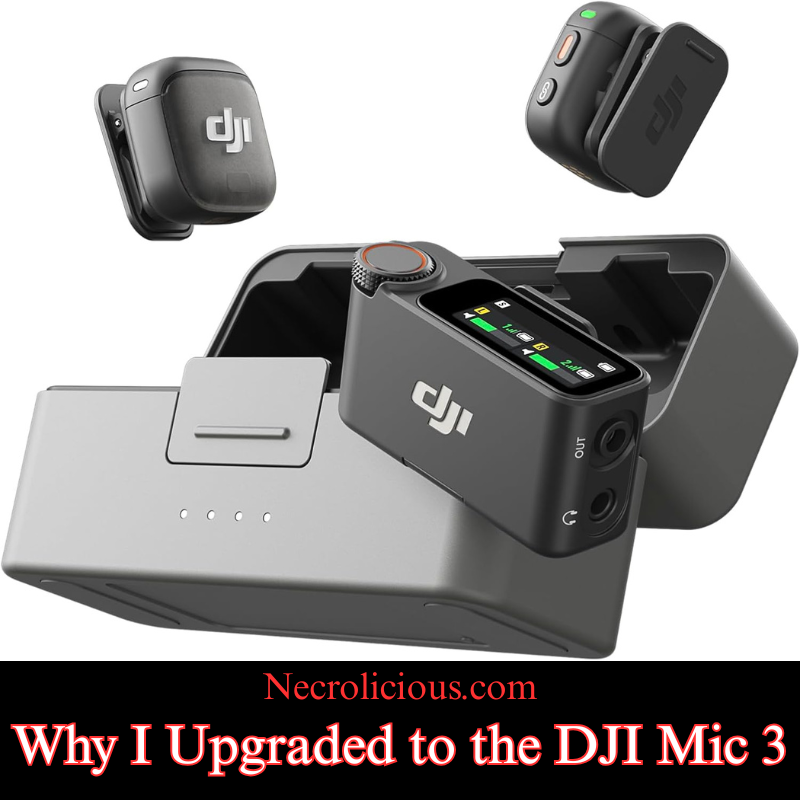
Why I Upgraded to the DJI Mic 3

@necroliciousjp

セールのかげでDJI Mic 2からDJI Mic 3にアップグレードした。 今日、アンボックスしよう! 次は録音確認🎤🎤🎤 #djimic2 #djimic3 #dji #アンボックス #creatorsearchinsights

♬ оригинальный звук – ᨧᨧ 🦴 ⊹ .˚

I was always very satisfied with my DJI Mic 2 & probably would not have upgraded to the Mic 3, were it not for the current 14% off sale which continues until February 10th (2026). Since the Mic 3 became 14% off & I got an additional 2,828 Rakuten points for the purchase, it just made sense to sell off my Mic 2 & buy to the Mic 3 — the sale basically made it free for me to upgrade! But that’s not the only reason I upgraded from the DJI Mic 2 to the DJI Mic 3. There are several other reasons, which I will delve into in this article, so you can be better informed about your own decision as to whether or not to upgrade from a prior-generation DJI Microphone. Without further ado, here are my reasons:

14% off on Rakuten Japan until 2/10!

Memory Supply Crunch Threatening Repricing

There is also the matter of the memory supply crunch which will be affecting technology for at least the next couple of years. I have written my own reports on this topic, but I am not the only one ringing the alarm bell to get what devices you can before major repricing; other well-respected technological news outlets are now reporting similar cautions, urging people to buy a Nintendo Switch 2 now before a global repricing occurs. I don’t think this will remain specific to the Nintendo Switch 2 alone, but rather ANY device which has memory components, such as the Mic 3. This crunch stems from ongoing global supply chain issues & increased demand for AI-driven devices which could drive up prices for memory-intensive products like the Mic 3’s expanded 32GB storage. If you are eyeing an upgrade, acting soon might avoid future cost hikes similar to those anticipated for gaming consoles & smartphones.

Enhanced On-Board Memory & Related Features

Speaking of memory the onboard recording on the Mic 3 is four times that of the Mic 2. The Mic 2 only had 8 gigabytes of internal memory whereas the Mic 3 has 32 gigabytes. Plus it allows you to dual record tracks of both the native audio input & the AI-enhanced audio adjusted input. Beyond storage, the Mic 3’s dual-band wireless technology ensures more stable connections in crowded environments & its voice tone presets let you tailor audio output on the fly—options like “natural” for interviews or “bright” for energetic content. Compatibility is broad including seamless integration with DJI cameras smartphones & laptops via adapters, though I recommend testing with your specific setup.

Concert Recording?

On the subject of adjustments, this should ostensibly allow better recording of live concerts, something that the Mic 2 was notoriously bad at. Try as I may, no Mic 2 settings configuration stopped the audio from being so unusably bad that I gave up & went on to recording a live concert using the Pocket 3’s onboard recorder (which sounds fine & non-distorted) instead of any external microphone whatsoever. The Mic 3’s enhancements could mitigate such distortion from high-decibel events by capturing a wider dynamic range. Though there were several articles on the topic of the Mic 2’s poor concert recording capabilities, I have not been able to source any content, positive or negative, in regards to concert use for the Mic 3, so I will personally conduct tests in the coming weeks using the various settings to see if I can get non-distorted audio in a live concert setting. If successful, it could make the Mic 3 a viable option for capturing live performances. If you do not intend to record concerts, at all this isn’t anything you need to worry about, no matter which generation of the Mic series you possess. The Mic 2 has always performed exceptionally well when simply speaking into it, as most creators do–but it is something to keep in mind if you actually intend to record concerts, whether you are a musician or a spectator.

Enhanced Communication via Numerology

Lastly, this is a little bit more on a personal note that many people may not take into account or take seriously at all, but in numerology the number 3 is the number of communication. Therefore, I think that having a device branded with the number 3 will metaphysically enhance my communication skills & help me convey what I wish to to my viewing audience. Like astrology, etc. I think it’s good fun & I enjoy things such as this, but no need to take it into account if you are not spiritual or superstitious.

To help illustrate the key differences at a glance here is a detailed comparison of specifications between the DJI Mic 2 & Mic 3 based on official details & hands-on reviews:

FeatureDJI Mic 2DJI Mic 3
Internal Storage (per Transmitter)8 GB (approx. 14 hours of 48kHz/24-bit audio)32 GB (approx. 56 hours of 48kHz/24-bit audio)
Battery Life (Total with Charging Case)Up to 18 hoursUp to 28 hours
Transmitter Dimensions46.06 × 30.96 × 21.83 mm28.77 × 28.34 × 16.35 mm (with magnetic clip)
Transmitter Weight28 g16 g (with magnetic clip); approx. 10 g without
Wireless Range (Line of Sight)Up to 250 m (FCC); 160 m (CE)Up to 400 m (FCC); 250 m (CE) with dual-band (2.4/5 GHz) support
Audio Recording Format24-bit/48kHz; 32-bit float option24-bit/48kHz; enhanced 32-bit float with dual-file (processed & unprocessed) & lossless recording
Noise Reduction LevelsSingle settingTwo levels (standard & strong) with AI enhancements
Additional Features3.5mm jack for external mics; basic noise cancellingTimecode syncing for multi-camera shoots; voice tone presets (e.g. natural, warm, bright); supports up to 4 transmitters; AMOLED touchscreen with rotary knob on receiver; no 3.5mm jack
Wireless Technology2.4 GHzDual-band 2.4/5.8 GHz with automatic frequency hopping & Bluetooth integration

This table highlights tangible upgrades in portability battery life & audio flexibility which influenced my decision but also underscores trade-offs like the lack of a 3.5mm jack.

Pros & Cons of Upgrading to the DJI Mic 3

While the Mic 2 remains a solid choice for most users the Mic 3 introduces refinements that could justify an upgrade depending on your needs. Here is a balanced overview tied to common scenarios:

Pros:

  • Enhanced Portability for On-the-Go Creators: The transmitters are significantly smaller & lighter making them ideal for vloggers or mobile journalists who prioritise discretion & comfort during long shoots. For instance if you are filming travel content or interviews the reduced bulk (from 28g to 16g) means less fatigue without sacrificing audio quality.
  • Superior Battery Life & Range for Extended Use: With up to 28 hours total battery (versus 18 hours) & a 400m range this suits event videographers or drone operators needing reliable wireless performance in larger venues or outdoors. It reduces the need for mid-shoot recharges & minimises dropouts.
  • Advanced Audio Features for Professionals: Dual-file recording (native & AI-processed) voice tone presets & two-level noise cancellation allow for better post-production flexibility. This is a boon for podcasters or filmmakers dealing with noisy environments or requiring customised sound profiles like a “warm” tone for voiceovers.
  • Timecode Syncing for Multi-Device Workflows: If you work with multiple cameras (e.g. DJI Osmo Pocket or cinema rigs) the built-in timecode ensures seamless audio-video alignment saving hours in editing. This is particularly valuable for professional video production teams.

Cons:

  • Loss of 3.5mm Jack for External Mics: As mentioned this limits compatibility with lavalier or shotgun mics which could be a dealbreaker for users relying on specialised audio inputs. Stick with the Mic 2 if you need this versatility.
  • Potential Overkill for Beginners: Features like timecode & dual-band may go unused by hobbyists or solo creators leading to unnecessary complexity. If your setup is simple (e.g. smartphone vlogging) the Mic 2 offers better value.

Ultimately weigh these against your workflow—for vloggers the pros in portability shine while professionals may appreciate the advanced tools but casual users might skip the upgrade.

The prior generations still work great & I would definitely recommend them for content creators that either do not have the funds or general interest in the Mic 3. For many use cases there is simply no need to upgrade to it &, for others, there are actual reasons why you would not want to upgrade such as the DJI Mic 3 not having a 3.5mm audio jack to which you can connect a lavalier mic or shotgun mic to, but in the entirety of the time that I have owned the Mic 2 which is just shy of two years now I have never once needed that audio jack except to plug in the windscreen.

Buy on Suzuri

Unless otherwise noted, image assets above are NOT original content & are shared under fair use doctrine with NO claims to authorship or ownership.
Contact necrolicious@necrolicious.com for credit or removal.

This post was sponsored by…ME! If you’d like to support, please buy my original meme merchandise or check out my affiliate links to get yourself some other cool things. Additional affiliate links may be contained in the above article. If you click on an affiliate link & sign up/make a purchase, I may earn a commission. This does not increase the price you pay for the product or service, so it helps support this website at no cost to you.
Share this:

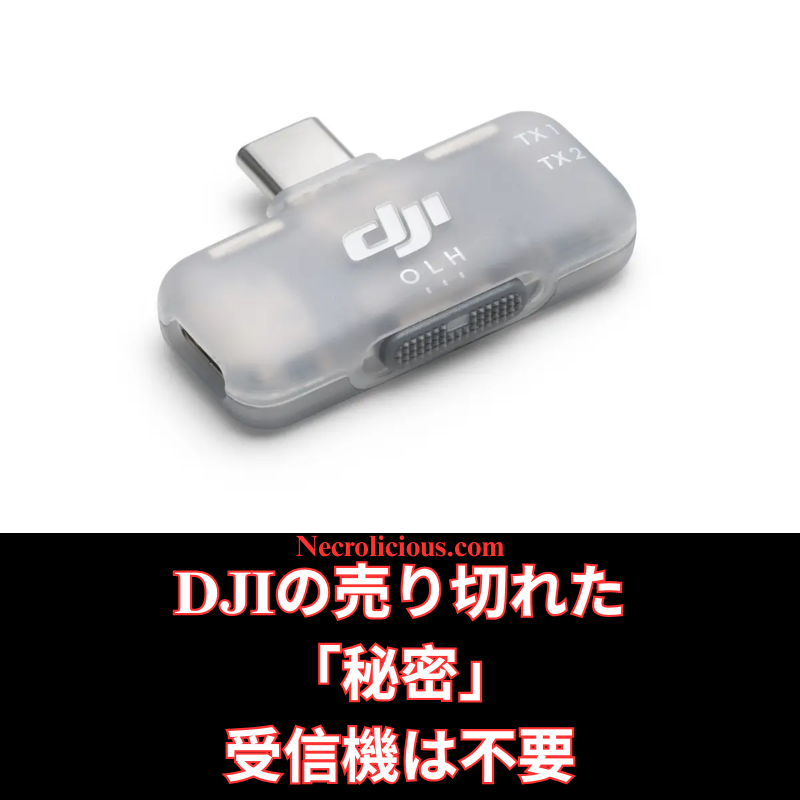
DJIの売り切れた「秘密」受信機は不要

ついこの間まで、俺は「DJI Mic を受信機なしで使う方法」を記事&動画で紹介していました。
ところがここ数週間、特にYouTubeで多くのクリエイターが「DJIがこっそり出した“秘密のモバイル受信機”」に大騒ぎしています。スマホ撮影向けに静かに発売されたこのアイテム、頻繁に完売しており、メルカリなどで法外な転売価格で取引されている状況です。

そこで改めてお伝えします――あなたはその受信機、実は全く必要ありません
別に「すべての物欲を捨てて出家しろ」という話ではなく、外部受信機なしで、しかも無料で同じ機能を手に入れる方法をもう一度しっかりお教えします!

楽天で購入

iPhoneユーザー向け

そもそもこの「秘密の受信機」はUSB-C仕様のみで、Lightning端子の古いiPhoneとは物理的に互換性がありません(手に入っても使えない可能性大)。

  1. RØDE Reporterをインストール
    App Storeで「RØDE Reporter」を検索(完全無料・登録不要)。ダウンロード後、マイク使用許可をオンに。
  2. DJI Mic 2をBluetooth接続
    送信機(トランスミッター)のリンクボタンを長押し→インジケーターが点滅したらペアリングモードに入ります。
    iPhoneの「設定 → Bluetooth」から「DJI Mic 2」(ヘッドホンとして表示される場合あり)を選択。
  3. RØDE Reporterで接続確認
    アプリを起動し、「External Microphone」と表示されていれば接続成功。
  4. 標準カメラアプリで撮影
    RØDE Reporterをバックグラウンドで起動させたまま、標準の「カメラ」アプリを起動 → ビデオモードを選択。
    これだけでDJI Mic 2の音声がワイヤレスで録音されます!
  5. 録画スタート
    短いテスト撮影をして音質・音量を確認してください。
楽天で購入

注意点
Bluetooth接続中は再生音がDJI Mic 2側に回ってしまう(スピーカーないので無音になる)ので、再生したいときはBluetoothを切るか送信機の電源をオフにしてください。

iPhone用動画解説はこちら

@necroliciousjp

iPhoneのネイティブカメラでDJI Mic 2をBluetooth接続してビデオ撮影する方法(受信機不要) #djimic2 #mic2 #dji #電子機器 #creatorsearchinsights

♬ original sound – Necrolicious JP🇯🇵 – Necrolicious JP🇯🇵

Samsungユーザー向け(超簡単!)

アプリのインストールすら不要です!

  1. DJI Mic 2をBluetoothペアリング
    送信機の録音ボタン(リンクボタン)を3秒長押し → ステータスインジケーターが青く点滅したらペアリングモード。
    端末側:「設定 → 接続 → Bluetooth」→「DJI Mic 2」を選択(ヘッドセットやマイクとして表示されます)。接続完了でインジケーターが青く点灯。
  2. 標準カメラアプリを「プロビデオ」モードで起動
    カメラアプリを開き、下部の「MORE」→「プロビデオ」を選択。
  3. 音声入力ソースをDJI Mic 2に変更
    画面右側のマイクアイコンをタップ →「Bluetooth」または「外部マイク」(機種によってはDJI Mic 2が直接表示)を選択。
    内部マイクはオフにしてください。
  4. 録画開始
    解像度・フレームレート等を調整後、録画ボタンを押すだけ。DJI Mic 2の高音質音声が完璧に同期して録音されます。
    こちらも短いテスト撮影をおすすめします!
楽天で購入

Samsung用動画解説はこちら

@necroliciousjp

@Samsung Japan のネイティブカメラでDJI Mic 2をBluetooth接続してビデオ撮影する方法(受信機不要) #djimic2 #mic2 #dji #電子機器 #creatorsearchinsights

♬ original sound – Necrolicious JP🇯🇵 – Necrolicious JP🇯🇵

まとめ

定価たった2500円のこのモバイル受信機、価格自体は良心的だったんですが、供給不足で転売屋が暴騰させています。
でも上のやり方で完全に無料で同じことができちゃうので、もう受信機を買う必要はゼロ!
浮いたお金でNecrolicious StoreのTシャツでも買って、撮影でカッコよく決めてください(笑)

SUZURIで購入
Share this:

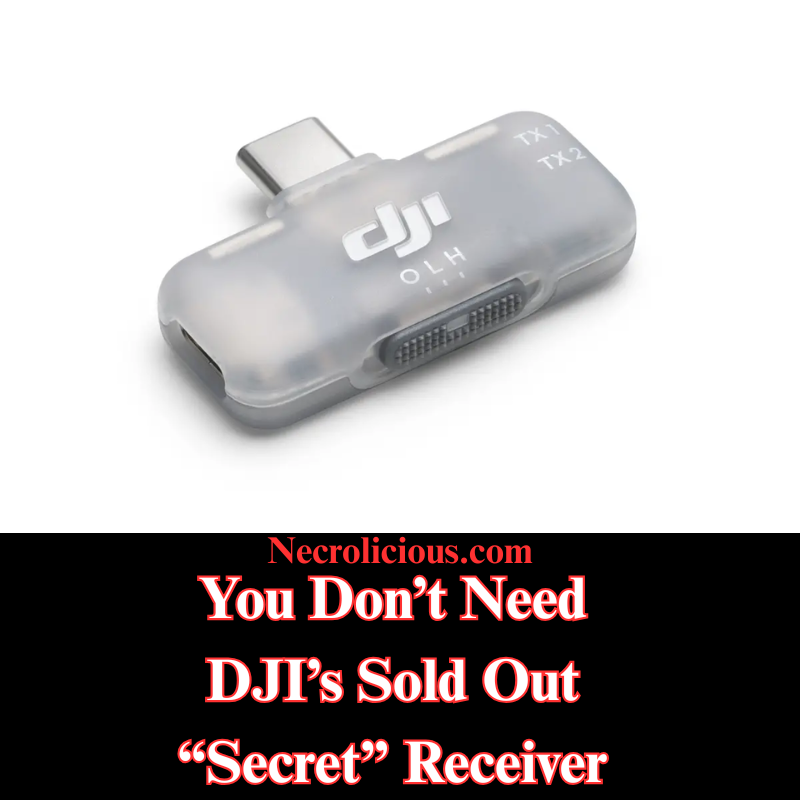
You Don’t Need DJI’s Sold Out “Secret” Receiver

Not even all that long ago, I wrote & provided video instructions for how to use DJI Mic devices without receivers. However, in recent weeks, many content creators, particularly on Youtube, have been going crazy over a supposedly “secret” item: a mobile receiver that DJI quietly released for content creators who use their phones to record.

This secret item has frequently sold out to the point that many people are paying exorbitantly high markups on eBay & the like just to get their hands on one. So I’m here to remind you that you don’t actually need this device. I don’t say that just in the general sense that you should forgo all worldly possessions, give up on your content creation dreams & become a monk, but to show you again how you can get this device’s functionality, FOR FREE, without the need or use of any external receiver.

Buy on Rakuten Japan

For iPhone

Starting off with iPhone since you people may well not be able to use this receiver, should you even be able to get your hands on one, due to the fact that it only comes in a USB-C configuration & is incompatible with older iPhone devices with Lightning ports.

  1. Install RØDE Reporter: Search for “RØDE Reporter” in the App Store (don’t worry, it’s free–no signup or subscription necessary), download it, & grant microphone permissions when prompted.
  2. Connect DJI Mic 2 via Bluetooth: Press & hold the pairing button on the DJI Mic 2 transmitter until the indicator flashes, entering pairing mode. On your iPhone, navigate to Settings > Bluetooth & select the DJI Mic 2 (it may appear as “headphones”).
  3. Confirm Connection in RØDE Reporter: Launch the app & verify it displays “External Microphone” rather than “Internal Microphone,” indicating the DJI Mic 2 is connected.
  4. Open the Native Camera App: Keep RØDE Reporter running in the background. Launch the iPhone’s Camera app, select Video mode, & the DJI Mic 2 will capture audio wirelessly.
  5. Record Your Video: Begin recording. Create a short test clip to ensure audio quality & levels are satisfactory.

NOTE: The Bluetooth connection may route audio output to the DJI Mic 2, which lacks speakers. Disable Bluetooth or power off the Mic 2 to hear playback through your iPhone speakers after recording.

Video Instructions for iPhone

Buy on Rakuten Japan

For Samsung

Much easier than iPhone, there’s no need for you to download anything, simply go to your native camera app & enter Pro Video mode to pair your DJI Mic via Bluetooth.

  1. Connect DJI Mic 2 via Bluetooth: Power on the DJI Mic 2 transmitter. Press and hold the record button (link button) for three seconds until the status indicator flashes blue, entering Bluetooth pairing mode. On your Samsung Galaxy device, navigate to Settings > Connections > Bluetooth, ensure Bluetooth is enabled & select “DJI Mic 2” from the list of available devices (it may appear as a headset or microphone). Confirm any pairing prompts. The indicator will turn solid blue once connected.
  2. Launch the Native Camera Application in Pro Video Mode: Open the stock Camera application on your Samsung Galaxy device. Swipe left or tap “MORE” at the bottom, then select “PRO VIDEO”. This mode provides advanced controls, including the ability to select external audio inputs.
  3. Select the DJI Mic 2 as Audio Input: In Pro Video mode, locate the audio settings icon (typically a microphone symbol) above or near the record button on the right side of the screen. Tap it to access the audio source menu. Choose “Bluetooth” or “External Mic” (it may list the DJI Mic 2 directly). Ensure the internal microphone is disabled if prompted. The application will now utilise audio from the DJI Mic 2.
  4. Record Your Video: Adjust video parameters such as resolution, frame rate, or exposure as required. Press the record button to begin capturing video. The DJI Mic 2 will wirelessly record high-quality audio synchronised with your footage. Record a short test clip to verify audio levels and clarity.

Video Instruction for Samsung

Buy on Rakuten Japan

At its original $15 MSRP this mobile receiver that DJI released was generously priced. However, generous pricing proves futile with minimal supply, as evidenced by the secondary market AKA scalpers selling the DJI mobile receiver several times its original price. Still, armed with my how-to instructions above, you no longer need to purchase one at all so you can use that money you saved to buy yourself a shirt on the Necrolicious Store to look cool in all the videos you record.

“Photogenic” Funny Nosferatu Vampire Meme
100% Cotton Unisex Tee

Unless otherwise noted, image assets above are NOT original content & are shared under fair use doctrine with NO claims to authorship or ownership.
Contact necrolicious@necrolicious.com for credit or removal.

This post was sponsored by…ME! If you’d like to support, please buy my original meme merchandise or check out my affiliate links to get yourself some other cool things. Additional affiliate links may be contained in the above article. If you click on an affiliate link & sign up/make a purchase, I may earn a commission. This does not increase the price you pay for the product or service, so it helps support this website at no cost to you.

Share this:

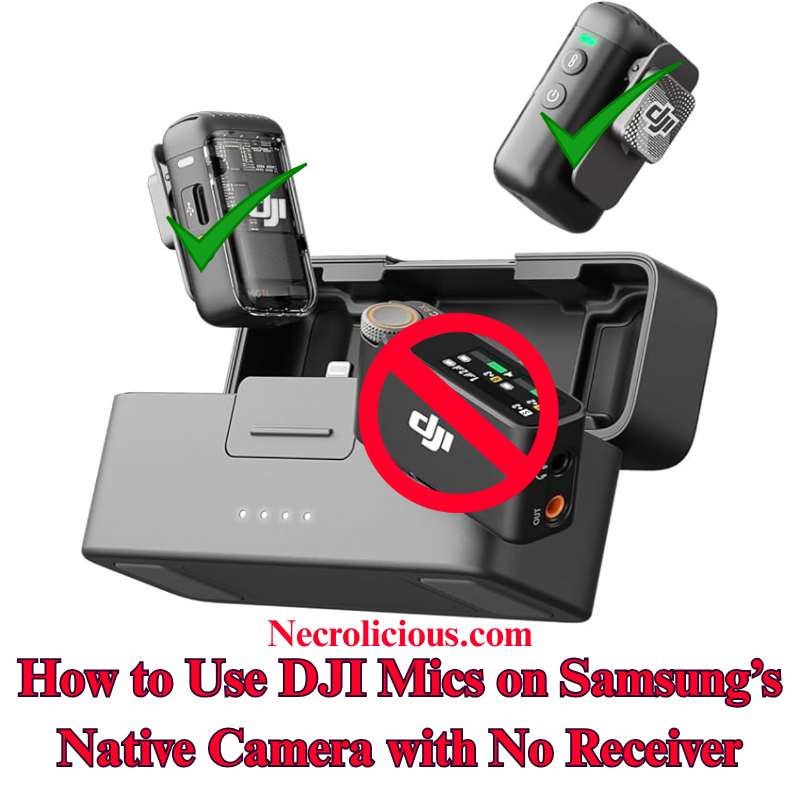
How to Use DJI Mic 2 on Samsung’s Native Camera for Video, No Receiver

Following extensive online research and testing, I have confirmed that connecting the DJI Mic 2 wirelessly to a Samsung Galaxy device’s native Camera application is significantly more straightforward than on other platforms. Unlike iOS, which restricts Bluetooth audio input in its Camera application, Samsung’s One UI enables direct selection of external Bluetooth microphones within the Pro Video mode of the stock Camera application. This eliminates the need for third-party applications or additional adapters, offering a seamless solution for creators seeking high-quality audio without extra equipment. I have tested & verified this method on recent Samsung Galaxy models, including the S23 & S24 series, using the DJI Mic 2 transmitter directly. This approach is likely to function with other Bluetooth microphones from various brands, though I have not tested alternatives such as the DJI Mic Mini or Mic 3. If you experiment with a different Bluetooth microphone, please share your results in the comments below.

Why This Method is Valuable

The DJI Mic 2 delivers exceptional audio quality, with features such as 32-bit float internal recording and intelligent noise cancellation. However, the receiver adds unnecessary cost & complexity for mobile video production. Samsung’s native support for Bluetooth microphones in Pro Video mode provides a cost-effective, portable solution that maintains professional audio standards, simplifying the recording process for creators.

Step-by-Step Guide to Recording Video with DJI Mic 2, No Receiver

  1. Connect DJI Mic 2 via Bluetooth: Power on the DJI Mic 2 transmitter. Press and hold the record button (link button) for three seconds until the status indicator flashes blue, entering Bluetooth pairing mode. On your Samsung Galaxy device, navigate to Settings > Connections > Bluetooth, ensure Bluetooth is enabled & select “DJI Mic 2” from the list of available devices (it may appear as a headset or microphone). Confirm any pairing prompts. The indicator will turn solid blue once connected.
  2. Launch the Native Camera Application in Pro Video Mode: Open the stock Camera application on your Samsung Galaxy device. Swipe left or tap “MORE” at the bottom, then select “PRO VIDEO”. This mode provides advanced controls, including the ability to select external audio inputs.
  3. Select the DJI Mic 2 as Audio Input: In Pro Video mode, locate the audio settings icon (typically a microphone symbol) above or near the record button on the right side of the screen. Tap it to access the audio source menu. Choose “Bluetooth” or “External Mic” (it may list the DJI Mic 2 directly). Ensure the internal microphone is disabled if prompted. The application will now utilise audio from the DJI Mic 2.
  4. Record Your Video: Adjust video parameters such as resolution, frame rate, or exposure as required. Press the record button to begin capturing video. The DJI Mic 2 will wirelessly record high-quality audio synchronised with your footage. Record a short test clip to verify audio levels and clarity.

How It Works

Samsung’s One UI, built on Android’s Bluetooth audio framework, supports external microphone input in Pro Video mode without the restrictions found in iOS. Once paired, the DJI Mic 2 functions as a standard Bluetooth audio device & Pro Video mode allows explicit selection of the input source. This ensures real-time wireless audio capture directly within the native application, eliminating the need for additional software or hardware.

Additional Guidance

  • Gain Adjustment: Adjust the DJI Mic 2’s gain settings via its built-in touchscreen or the DJI Mimo application (if installed) before recording. Test clips are recommended to ensure optimal audio levels in varied environments.
  • Firmware & Software Updates: Keep the DJI Mic 2 firmware updated via the DJI Mimo application, and ensure your Samsung Galaxy device runs the latest Android/One UI version to prevent connectivity issues.
  • Limitations for Live Streaming: This Bluetooth method may introduce slight latency, making it less suitable for live streaming. For such applications, consider using the wired receiver connected via a USB-C adapter.
  • Alternative Applications: If Pro Video mode is unavailable or you encounter issues, applications such as Open Camera or Blackmagic Camera support Bluetooth microphones and can serve as alternatives. However, for seamless integration, the stock Camera application is recommended. Note that older Samsung models with Exynos processors (e.g., pre-S21 European variants) may have compatibility limitations; Snapdragon-based devices, such as the S23 or S24 series, perform optimally.
  • Stereo Recording: For dual transmitters, pair both via Bluetooth, but verify stereo support in Pro Video settings, as mono is the default. Full stereo recording may require the receiver.

This method enables creators to capture professional-grade video & audio using the DJI Mic 2 with Samsung’s native Camera application, without requiring a receiver. Have you tested this approach on your Galaxy device, or discovered alternative solutions? Please share your feedback in the comments & distribute this guide to assist fellow aspiring videographers.

For those preferring a complete setup, the full DJI Mic 2 kit, including the receiver, ensures broader compatibility. With the recent release of the Mic 3, prices for the Mic 2 have reached their lowest levels, making it an excellent time to consider purchasing.

Buy on Rakuten Japan

Unless otherwise noted, image assets above are NOT original content & are shared under fair use doctrine with NO claims to authorship or ownership.
Contact necrolicious@necrolicious.com for credit or removal.

This post was sponsored by…ME! If you’d like to support, please buy my original meme merchandise or check out my affiliate links to get yourself some other cool things. Additional affiliate links may be contained in the above article. If you click on an affiliate link & sign up/make a purchase, I may earn a commission. This does not increase the price you pay for the product or service, so it helps support this website at no cost to you.

Share this:

How to Use DJI Mic 2 on iPhone’s Native Camera for Video, No Receiver

After extensive online research, I found no clear instructions for using the DJI Mic 2 wirelessly with the iPhone’s native Camera app for video recording. Consulting Grok, I developed a straightforward method using Bluetooth, eliminating the need for a receiver. I’m sharing this guide to help creators achieve high-quality audio with their DJI Mic 2 on the iPhone’s default Camera app, avoiding additional equipment costs. Note that I have tested & confirmed that this method works with the DJI mic 2. I highly suspect that it may also work with other Bluetooth microphones, including those by other brands, but I do not have the DJI Mic Mini or the DJI Mic 3, nor do I have other brands to test with. If you have another brand of Bluetooth microphone, please give it a try & comment below if it works.

Why This Method is Valuable

The DJI Mic 2 offers exceptional audio quality, but its Bluetooth functionality isn’t natively supported by the iPhone’s Camera app for video. Purchasing the receiver increases expense & setup complexity. This cost-free solution, utilising the RØDE Reporter app, ensures a portable, wireless recording experience.

Step-by-Step Guide to Recording Video with DJI Mic 2 with no Receiver

  1. Install RØDE Reporter: Search for “RØDE Reporter” in the App Store, download it, & grant microphone permissions when prompted.
  2. Connect DJI Mic 2 via Bluetooth: Press & hold the pairing button on the DJI Mic 2 transmitter until the indicator flashes, entering pairing mode. On your iPhone, navigate to Settings > Bluetooth & select the DJI Mic 2 (it may appear as “headphones”).
  3. Confirm Connection in RØDE Reporter: Launch the app & verify it displays “External Microphone” rather than “Internal Microphone,” indicating the DJI Mic 2 is connected.
  4. Open the Native Camera App: Keep RØDE Reporter running in the background. Launch the iPhone’s Camera app, select Video mode, & the DJI Mic 2 will capture audio wirelessly.
  5. Record Your Video: Begin recording. Create a short test clip to ensure audio quality & levels are satisfactory.

NOTE: The Bluetooth connection may route audio output to the DJI Mic 2, which lacks speakers. Disable Bluetooth or power off the Mic 2 to hear playback through your iPhone speakers after recording.

How It Works

iOS restricts Bluetooth microphones in the native Camera app. By activating the Bluetooth audio session in RØDE Reporter, the connection persists when switching to the Camera app, enabling wireless audio capture.

Additional Tips

  • Record a test clip to adjust the mic’s gain via its settings.
  • Ensure the DJI Mic 2 firmware & iOS are updated to prevent connectivity issues.
  • For live streaming, this method is unreliable; use the wired receiver instead.
  • Another option for using the DJI Mic 2 & other Bluetooth microphones is to download the Blackmagic Camera app & record using it instead of the native iPhone camera, but some users have reported issues with file management using this app, so this article’s method is best for those who prefer to use the native iPhone camera rather than 3rd party camera apps.

This method enables creators to record professional-grade video audio with the DJI Mic 2 on the iPhone’s native Camera app, without a receiver. Have you tested this approach or discovered other solutions? Share your feedback below & distribute this guide to assist fellow creators.

Of course, if you want to avoid the added hassle of such workarounds, you can buy the real thing, transmitter included. Prices on the Mic 2 recently dropped to record lows with the release of the Mic 3, so there has never been a better time to buy!

Buy on Rakuten Japan

Unless otherwise noted, image assets above are NOT original content & are shared under fair use doctrine with NO claims to authorship or ownership.
Contact necrolicious@necrolicious.com for credit or removal.

This post was sponsored by…ME! If you’d like to support, please buy my original meme merchandise or check out my affiliate links to get yourself some other cool things. Additional affiliate links may be contained in the above article. If you click on an affiliate link & sign up/make a purchase, I may earn a commission. This does not increase the price you pay for the product or service, so it helps support this website at no cost to you.

Share this:

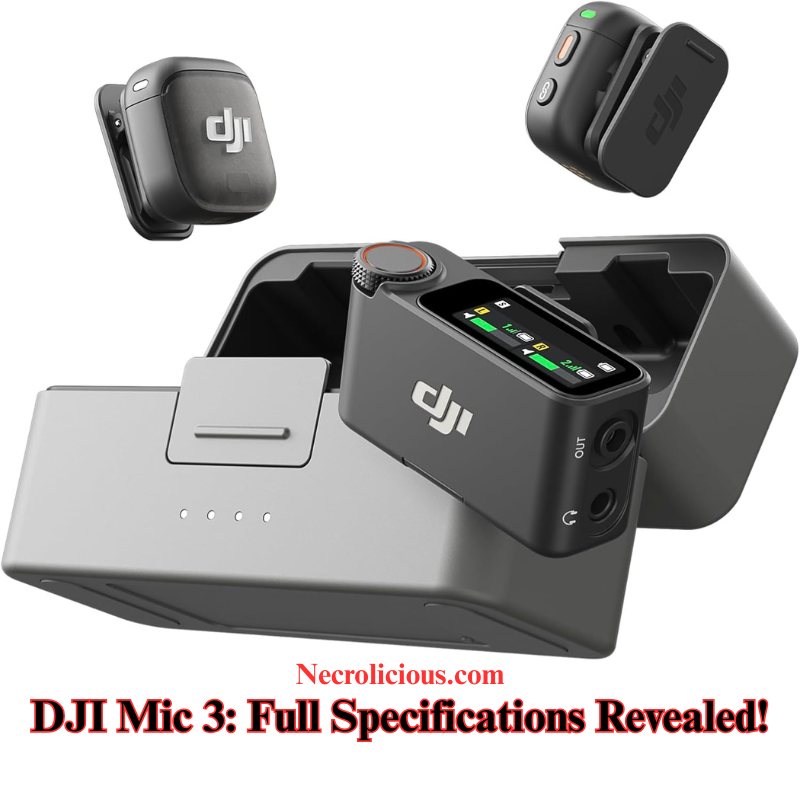
DJI Mic 3: The Most Cutting Edge Wireless Microphone for Creators in 2025 – Full Specifications Revealed!

Are you a content creator, filmmaker, or podcaster tired of dealing with audio dropouts, limited channels, & cumbersome gear? Enter the DJI Mic 3, the latest evolution in wireless microphone technology from DJI, launched on August 28, 2025. This compact powerhouse builds on the success of the DJI Mic 2, introducing groundbreaking features like 4TX + 8RX capability, integrated timecode, & dual-band anti-interference for flawless audio in any environment. In this in-depth DJI Mic 3 review, we’ll explore its new features, how it stacks up against the DJI Mic 2, & why it’s a must-have upgrade for professional audio recording in 2025. Whether you’re searching for “DJI Mic 3 specs,” “DJI Mic 3 vs Mic 2,” or “best wireless microphone for video,” you’ve come to the right place.

Why the DJI Mic 3 is a Must-Have for Modern Creators

The DJI Mic 3 isn’t just an incremental update—it’s a leap forward designed for the demands of today’s multi-camera shoots, live streams, & on-the-go content creation. Weighing in at just 16g per transmitter (with magnet), it’s incredibly lightweight & intuitive, fitting seamlessly into your workflow without adding bulk. The compact storage case ensures everything stays organised, while fast charging keeps you powered up for extended sessions.

Key highlights include:

  • 4TX + 8RX Capability with Four-Channel Output: Sync up to four transmitters with eight receivers simultaneously, perfect for complex productions like interviews, events, or multi-angle filming. This is a massive step up from previous models, enabling lossless audio transmission across devices.
  • Adaptive Gain Control & Dual-Level Noise Cancelling: Automatically balances volume levels & reduces background noise with two intensity levels, ensuring crystal-clear audio even in noisy environments. Paired with three voice tone presets, it tailors sound to your style—natural, bright, or warm.
  • Dual-Band Anti-Interference Technology: Switches between 2.4 GHz & 5 GHz bands for reliable 400m transmission range, minimising dropouts in RF-crowded areas.
  • 32-Bit Float Internal Recording with Dual-File Backup: Capture high-dynamic-range audio without clipping, with up to 57.3 hours of 24-bit single-file recording per transmitter. The dual-file system provides a safety net for post-production.
  • Integrated Timecode: Simplifies editing by syncing audio with video timelines, saving hours in the workflow.
  • Extended Battery Life: Up to 8 hours per transmitter & 28 hours total with the charging case, plus quick charging for minimal downtime.

These features make the DJI Mic 3 ideal for YouTubers, TikTok creators, wedding videographers, & anyone needing professional-grade audio on a budget. Early leaks & hands-on previews highlight its omnidirectional polar pattern, 126 dB max SPL, & 72 dB SNR for superior sound quality. If you’re upgrading from the DJI Mic 2, you’ll notice immediate improvements in scalability & reliability.

DJI Mic 3 vs DJI Mic 2 Comparison

To help you decide if the DJI Mic 3 is worth the upgrade, here’s a detailed specs comparison table based on official data. This side-by-side view highlights the advancements in the new model.

FeatureDJI Mic 3DJI Mic 2
Transmitters SupportedUp to 4 TXUp to 2 TX
Receivers SupportedUp to 8 RX1 RX (standard)
Transmission Range400 m (dual-band 2.4/5 GHz)250 m (FCC) / 160 m (CE) (2.4 GHz only)
Battery Life (TX)8 hours (per TX); up to 28 hours with case6 hours (per TX); up to 18 hours with case
Onboard RecordingUp to 57.3 hours (24-bit single file); 21.5 hours (32-bit float dual file) per TXUp to 14 hours (24-bit) or 11 hours (32-bit) per TX
Bit Depth32-bit float / 24-bit (switchable)32-bit float / 24-bit
Noise ReductionDual-level + adaptive gain controlIntelligent noise cancelling
Timecode SyncYesNo
Polar PatternOmnidirectionalOmnidirectional
Frequency Response20 Hz-20 kHz (low cut off, encoded); 100 Hz-20 kHz (low cut on)50 Hz-20 kHz (low cut off); 100 Hz-20 kHz (low cut on)
Max SPL126 dB SPL @1% THD; 130 dB @10% THD120 dB SPL
SNR72 dBNot specified (equivalent noise 21 dBA)
Equivalent Noise22 dBA21 dBA
Transmitter Dimensions28.77 × 28.34 × 16.35 mm (with magnet)46.06 × 30.96 × 21.83 mm
Transmitter Weight16 g (with magnet)28 g
Receiver Display1.1-inch AMOLED touchscreen + rotary controlsOLED touchscreen
Operating Temperature-10° to 45° C-10° to 45° C
Charging Time (TX)Approx. 50 minutes70 minutes
Wireless ModesWi-Fi (802.11 a/b/g/n/ac/ax), SDR customisableGFSK 1/2 Mbps

This table shows the DJI Mic 3’s superiority in multi-device support, range, battery life, & audio processing—making it a pro-level tool while remaining compact.

Should You Upgrade to the DJI Mic 3?

If you’re still using the DJI Mic 2, the Mic 3 offers compelling reasons to switch: longer range, better noise handling, & timecode for faster editing. However, if your needs are basic (e.g., solo vlogging), the Mic 2 remains a solid, more affordable option. Priced around $309 for the kit (based on leaks), the Mic 3 delivers excellent value. Early adopters praise its dual-file recording for peace of mind during critical shoots.In a market flooded with wireless mics like Rode Wireless GO II or Sennheiser XS, the DJI Mic 3 stands out for its integration with DJI ecosystems (like Osmo Pocket or drones) & user-friendly app controls.

Final Thoughts: Elevate Your Audio Game with DJI Mic 3

The DJI Mic 3 redefines wireless audio with its innovative features, making it one of the best microphones for video in 2025. Whether you’re capturing weddings, podcasts, or YouTube content, its reliability & ease of use will transform your productions. Ready to upgrade? Check it out on the official DJI store today.What do you think of the DJI Mic 3? Share your thoughts in the comments below, & subscribe for more tech reviews & comparisons!

Buy on Rakuten

Unless otherwise noted, image assets above are NOT original content & are shared under fair use doctrine with NO claims to authorship or ownership.
Contact necrolicious@necrolicious.com for credit or removal.

This post was sponsored by…ME! If you’d like to support, please buy my original meme merchandise or check out my affiliate links to get yourself some other cool things. Additional affiliate links may be contained in the above article. If you click on an affiliate link & sign up/make a purchase, I may earn a commission. This does not increase the price you pay for the product or service, so it helps support this website at no cost to you.
Share this: