Silent Hill Remake Announced: A New Dawn for Psychological Horror

Silent Hill Remake: Konami & Bloober Team Revive a Horror Classic

The Return of Silent Hill: What We Know About the Remake

The Silent Hill remake marks a significant milestone for the series, which has been dormant for years. Announced during Konami’s Press Start Live showcase, the remake is being developed by Bloober Team, the same studio behind the critically acclaimed Silent Hill 2 remake released in October 2024. This project is not just a nostalgic nod to the past but a full-fledged reimagining of the original game that introduced players to the haunting atmosphere & psychological depth that define the Silent Hill series.

Details about the Silent Hill remake are still emerging, but the announcement has already generated a wave of speculation & anticipation. The original game, released in 1999, is renowned for its innovative use of fog to create a sense of dread & its complex narrative that delves into themes of guilt, redemption, & the supernatural. Bloober Team’s involvement suggests that the remake will aim to preserve these core elements while updating the graphics, gameplay mechanics, & possibly even expanding the story to appeal to both veteran fans & new players.

Konami’s decision to partner with Bloober Team is a strategic one, given the studio’s proven track record in horror gaming. The Silent Hill 2 remake, which sold over two million copies, was praised for its faithfulness to the original while introducing modern innovations. Critics & players alike lauded its atmospheric setting, Akira Yamaoka’s haunting soundtrack, & the performances, particularly Luke Roberts as James Sunderland. This success has laid a strong foundation for the Silent Hill remake, with expectations high for a similar level of quality & respect for the source material.

Buy on Amazon US

Buy on Amazon Japan

Buy on Rakuten Japan

Masahiro Ito, the original creature designer, & Akira Yamaoka, the composer, are returning to ensure the remake captures the essence of the first game. Ito’s involvement in providing concept art for locations & monsters, combined with Yamaoka’s musical contributions, promises to maintain the series’ signature style. Bloober Team’s creative director, Mateusz Lenart, has emphasised the importance of preserving the atmosphere that made Silent Hill exceptional, while also modernising aspects of the gameplay. This approach mirrors their work on Silent Hill 2, where the third-person combat system & certain story set pieces were completely rebuilt to enhance the experience without losing the original’s soul.

The announcement of the Silent Hill remake is part of a broader revival of the franchise. Alongside this project, Konami has been working on other initiatives, including Silent Hill f, Silent Hill: Townfall, & Silent Hill: Ascension, as well as the film Return to Silent Hill. This multi-faceted approach indicates a comprehensive effort to bring the Silent Hill universe back to prominence in both gaming & other media.

Stay tuned for further updates on the “Silent Hill” remake as Konami & Bloober Team continue to unveil more about this highly anticipated project. The fog may be thick, but the path to Silent Hill is clearer than ever.

Unless otherwise noted, image assets above are NOT original content & are shared under fair use doctrine with NO claims to authorship or ownership.
Contact necrolicious@necrolicious.com for credit or removal.

This post was sponsored by…ME! If you’d like to support, please buy my original meme merchandise or check out my affiliate links to get yourself some other cool things. Additional affiliate links may be contained in the above article. If you click on an affiliate link & sign up/make a purchase, I may earn a commission. This does not increase the price you pay for the product or service, so it helps support this website at no cost to you.

Share this:

Samsung Galaxy Watch 8 Classic Design Appears to Have Leaked on American eBay Listing

The highly anticipated Samsung Galaxy Watch 8 Classic is making waves ahead of its official launch, with a listing on eBay offering the first hands-on glimpse of its revamped design, upgraded specs, & innovative features. It is unknown how this seller has obtained the watch or if it’s authentic, but here’s everything you need to know about this exciting find.

A Fresh Look at the Galaxy Watch 8 Classic

We now have purportedly real-world images of the Galaxy Watch 8 Classic, showcasing its sleek & modern aesthetic. The smartwatch sports a distinctive “squircle” shape, a design element hinted at in earlier leaks. This hybrid square-circle form gives the device a bold yet refined look, setting it apart from its predecessors.

The raised bezel, a hallmark of Samsung’s Classic series, is prominently featured & supports rotation, as the listing was updated to confirm this functionality. The watch’s premium build is complemented by a leather strap, likely included as standard, enhancing its sophisticated appeal.

Key Specifications & Upgrades

One of the standout revelations from the eBay listing is the Galaxy Watch 8 Classic’s impressive 64GB of internal storage—double the capacity of last year’s Galaxy Watch Ultra. This substantial upgrade makes it ideal for storing apps, music, & offline content, catering to users who demand more from their wearable tech.

Another notable change is the adoption of the band connection system introduced with the Galaxy Watch Ultra. This means traditional pin-based bands won’t be compatible without an adapter, a shift that may require some adjustment for long-time Samsung watch users. However, the new system promises greater versatility & durability.

What’s Not Working Yet?

While the eBay listing provides a tantalising preview, the Galaxy Watch 8 Classic isn’t fully functional yet. According to the seller, the Galaxy Wearable app cannot complete the setup process, suggesting that Samsung is still fine-tuning the software ahead of the official release.

Buy from Amazon US

Buy from Amazon JP

Buy from Rakuten JP

When Can You Get Your Hands on It?

If you don’t want to risk buying a sketchy eBay item, Samsung is gearing up to unveil the Galaxy Watch 8 series in early July 2025, alongside its latest foldable smartphones. The timing aligns with the company’s typical summer launch window, & excitement is building for what promises to be a stellar lineup of devices.

Why the Galaxy Watch 8 Classic Matters

The Galaxy Watch 8 Classic combines cutting-edge technology with a timeless design, making it a top contender in the smartwatch market. Its enhanced storage, updated band system, & sleek squircle aesthetic position it as a must-have for tech-savvy buyers looking to upgrade their wristwear.

Stay tuned for more updates as Samsung’s launch event approaches, & let me know in the comments how you’re liking the new design!

Unless otherwise noted, image assets above are NOT original content & are shared under fair use doctrine with NO claims to authorship or ownership.
Contact necrolicious@necrolicious.com for credit or removal.

This post was sponsored by…ME! If you’d like to support, please buy my original meme merchandise or check out my affiliate links to get yourself some other cool things. Additional affiliate links may be contained in the above article. If you click on an affiliate link & sign up/make a purchase, I may earn a commission. This does not increase the price you pay for the product or service, so it helps support this website at no cost to you.

Share this:

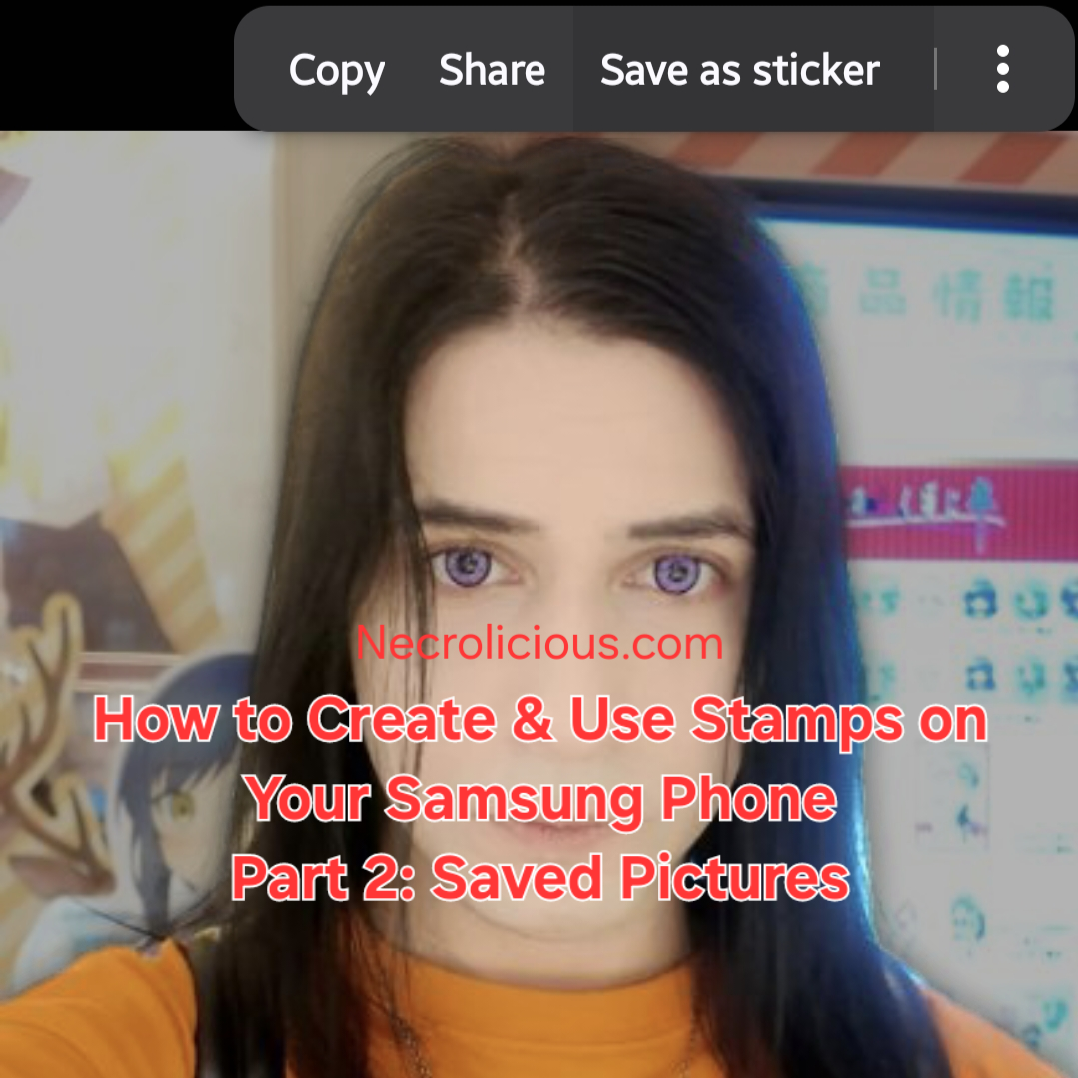
How to Create & Use Stamps on Your Samsung Phone Part 2: Saved Pictures

In yesterday’s part 1, I showed you how to create stamps using your Samsung phone’s camera. Today, I will teach you how to do it using ANY picture you find on the internet & save to your Samsung phone.

How to Create & Use Stamps on Your Samsung Phone

Step 1. Find a picture you like online & save it:

Save the picture of the idol, character or other item you want to make into a stamp.

Step 2. Open the photo:

Use Samsung Gallery to open the picture of the person or object you selected.

Step 3. Select the object:

Touch and hold the person or object in the photo on the screen for a few seconds and wait for the stamp creation options to appear.

Step 4. Save as stamp:

Select the “Save as stamp” option, choose your preferred style the tap “Done”.

Samsung Galaxy Z Flip6

Buy from Amazon US

Buy from Amazon JP

Buy from Rakuten JP

How to Access & Select Stamps Saved on your Samsung Phone

As we discussed yesterday, to access stamps, tap the button with the flower-like icon above the keyboard to open the stamp menu.

To use stamps, choose a saved stamp to add it to your social media comments/messages, E-mails, notes or use it to decorate your photos. You can use up to 10 stamps at a time.

Get creative: Have fun experimenting with different people & objects! Whose stamp would you like to create? Let me know in the comments!

Note: This feature is available on Samsung phones that support stamp creation. My model is a Samsung Flip 6. See part 1 for a full list of compatible devices as of this writing.

Unless otherwise noted, image assets above are NOT original content & are shared under fair use doctrine with NO claims to authorship or ownership.
Contact necrolicious@necrolicious.com for credit or removal.

This post was sponsored by…ME! If you’d like to support, please buy my original meme merchandise or check out my affiliate links to get yourself some other cool things. Additional affiliate links may be contained in the above article. If you click on an affiliate link & sign up/make a purchase, I may earn a commission. This does not increase the price you pay for the product or service, so it helps support this website at no cost to you.

Share this:

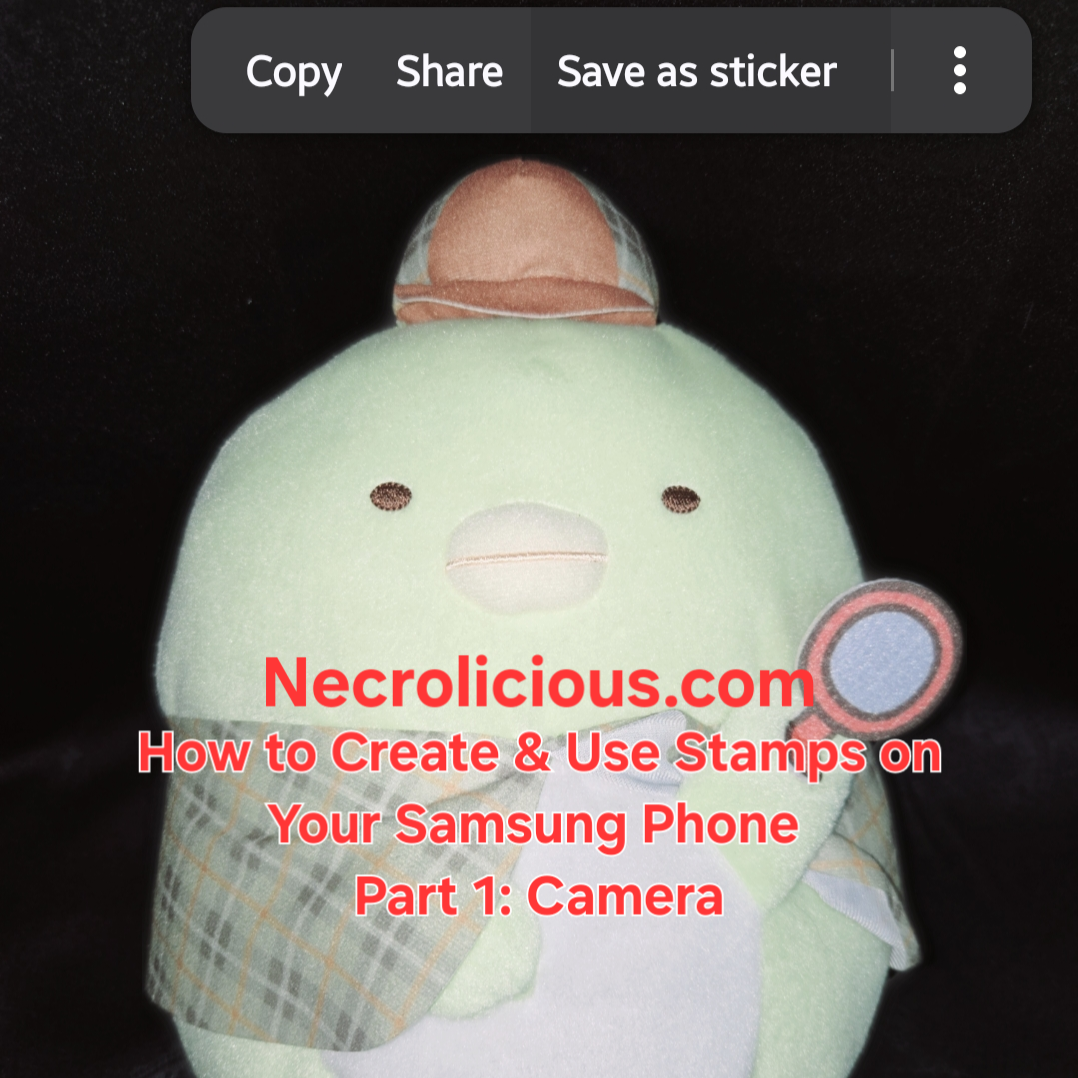
How to Create & Use Stamps on Your Samsung Phone Part 1: Camera

Are you sad that there is no official stamp for your favorite idol or character? If you have a Samsung phone, you can make anyone & anything into a stamp. Today in part 1, I will teach you how to do it using your Samsung phone’s camera.

How to create and use stamps on your Samsung phone

Step 1. Choose an object:

Choose an idol, character or other item you want to make into a stamp.

Step 2. Take a photo:

Use your Samsung phone’s camera to take a clear photo of the object you selected.

Step 3. Select the object:

Touch and hold the object in the photo on the screen for a few seconds and wait for the stamp creation options to appear.

Step 4. Save as stamp:

Select the “Save as stamp” option, choose your preferred style the tap “Done”.

To access stamps, tap the button with the flower-like icon above the keyboard to open the stamp menu.

To use stamps, choose a saved stamp to add it to your social media comments/messages, E-mails, notes or use it to decorate your photos. You can use up to 10 stamps at a time.

Get creative: Have fun experimenting with different objects! Whose stamp would you like to create? Let me know in the comments!

Note: This feature is available on Samsung phones that support stamp creation. My model is a Samsung Flip 6.

Samsung Galaxy Z Flip6

Buy from Amazon US

Buy from Amazon JP

Buy from Rakuten JP

Samsung Phones Supporting Stamp Creation
The stamp creation feature is available on Galaxy devices running One UI 5.0, One UI 6.0, or One UI 7.0. The following models are confirmed to support or are capable of running these software versions, making them compatible with the stamp creation feature:
Galaxy S Series
Galaxy S25 Series: S25, S25+, S25 Ultra, S25 Edge (released with One UI 7.0)

Galaxy S24 Series: S24, S24+, S24 Ultra, S24 FE (supports One UI 6.0 and later)

Galaxy S23 Series: S23, S23+, S23 Ultra, S23 FE (supports One UI 5.0 and later)

Galaxy S22 Series: S22, S22+, S22 Ultra (supports One UI 5.0 and later)

Galaxy S21 Series: S21, S21+, S21 Ultra, S21 FE (supports One UI 5.0 and later)

Galaxy S20 Series: S20, S20+, S20 Ultra, S20 FE (supports One UI 5.0 on most models)

Galaxy S10 Series: S10, S10+, S10e, S10 5G (some models support One UI 5.0, depending on region)

Galaxy Note Series (select models):
Galaxy Note 20, Note 20 Ultra (supports One UI 5.0 and later)

Galaxy Note 10, Note 10+, Note 10 Lite (some models support One UI 5.0, depending on region)

Galaxy Z Series (Foldables)
Galaxy Z Fold Series: Z Fold 6, Z Fold 5, Z Fold 4 (supports One UI 5.0 and later)

Galaxy Z Flip Series: Z Flip 6, Z Flip 5, Z Flip 4 (supports One UI 5.0 and later)

Earlier Foldables: Z Fold 3, Z Flip 3 (supports One UI 5.0 and later)

Galaxy A Series (Mid-Range)
Galaxy A16 5G, A26 5G, A36 5G (supports One UI 6.0 and later)

Galaxy A55 5G, A35 5G (supports One UI 6.0 and later)

Galaxy A54 5G, A34 5G (supports One UI 5.0 and later)

Galaxy A53 5G, A33 5G (supports One UI 5.0 and later)

Galaxy A52, A52 5G, A52s 5G (supports One UI 5.0 and later)

Galaxy A51, A51 5G (some models support One UI 5.0, depending on region)

Galaxy A32 5G (supports One UI 5.0 and later)

Other A-Series Models: Select models like A73, A72, A71, A42 5G, and A41 may support One UI 5.0, depending on region and update availability

Galaxy M Series (Budget)
Galaxy M55, M35, M34, M33 (supports One UI 5.0 or later, depending on region)

Galaxy M54, M53, M52 5G (supports One UI 5.0 and later)

Other M-Series Models: Some models like M32, M31, and M51 may support One UI 5.0 in select regions

Galaxy F Series
Galaxy F54, F34, F23 (supports One UI 5.0 and later)

Other F-Series Models: Select models may support One UI 5.0, depending on region

Additional Notes
Software Dependency: The stamp creation feature requires One UI 5.0 or later. Devices must be updated to at least Android 13 to access this feature. Some older models (e.g., Galaxy S10, A51) may not receive One UI 5.0 in all regions, so compatibility depends on the software update status. Check your device’s software version in Settings > About Phone > Software Information.

Feature Availability: The primary method for creating stamps is through the Gallery app (as described in the provided guide) or via the Lift Object feature (long-press on a subject in a photo). The Gallery app method is detailed in sources & works on One UI 5.0 and above. The Lift Object method, available on One UI 6.0 and later, allows saving objects as stamps with a transparent background for use in messaging apps like WhatsApp, Instagram, and Samsung Notes.

Samsung Keyboard Integration: To use custom stamps in messaging apps, they must be added to the Samsung Keyboard. This requires setting the Samsung Keyboard as the default and accessing the stamps via the emoji/sticker menu.

Limitations: Stamps created in the Gallery app are primarily for use within the Gallery or Samsung Notes. For broader use in apps like WhatsApp, the stamps need to be saved to the Samsung Keyboard or exported as PNGs with a transparent background. Some apps may add a black background when sharing, which is a known limitation.

AR Emoji and Galaxy Avatar: Starting with the Galaxy S25 series and One UI 7.0, AR Emoji features are renamed to Galaxy Avatar, which also supports stamp creation. This is available on select models running Android 15 and One UI 7.0.

Device Exclusions: Older models (e.g., Galaxy S9, A50, or earlier) or devices with limited specifications may not support One UI 5.0 or the stamp creation feature due to hardware or software limitations.

Verification

To confirm if your Samsung phone supports stamp creation:
Check the One UI version in Settings > About Phone > Software Information.

Open the Gallery app, select a photo, tap Edit (pencil icon), then look for the Decorations (smiley face) icon & Stickers option. If available, tap the Gallery icon and look for Create sticker.

Alternatively, try the Lift Object method: open a photo in the Gallery, long-press on a subject to check if the Save as sticker option appears (One UI 6.0 or later).

Unless otherwise noted, image assets above are NOT original content & are shared under fair use doctrine with NO claims to authorship or ownership.
Contact necrolicious@necrolicious.com for credit or removal.

This post was sponsored by…ME! If you’d like to support, please buy my original meme merchandise or check out my affiliate links to get yourself some other cool things. Additional affiliate links may be contained in the above article. If you click on an affiliate link & sign up/make a purchase, I may earn a commission. This does not increase the price you pay for the product or service, so it helps support this website at no cost to you.
Share this:

CastleVania Successor Announces a New Must-Play Vampire Game Series Entry–Bloodstained: The Scarlet Engagement

Bloodstained: The Scarlet Engagement – The Ultimate Side-Scrolling Vampire Game Experience Set for 2026

Bloodstained: The Scarlet Engagement as a Vampire Game: Echoes of Castlevania’s Dark Legacy

The announcement of Bloodstained: The Scarlet Engagement has sent ripples through the gaming community, particularly among fans of vampire games. As a spiritual successor to the legendary Castlevania series, this new 2026 release promises to deliver a rich, Gothic experience that embodies the essence of a true vampire game. Revealed during the recent State of Play event, Bloodstained: The Scarlet Engagement invites players into a world where darkness reigns, & the fight against demonic forces mirrors the timeless struggle against vampires.

Set in a haunting 16th-century England, Bloodstained: The Scarlet Engagement introduces a narrative where a mysterious ethereal castle, controlled by Demon Lord Elias, casts a shadow over the land. This setting is quintessential for a vampire game, with its Gothic architecture, cursed landscapes, & the pervasive threat of supernatural evil. The game features two new protagonists, Leonard Brandon & Alexander Kyteler, who must navigate this world to defeat Elias, much like vampire hunters of old. Their journey is not just a battle against demons but a delve into a vampire game’s core themes of horror, bravery, & redemption.

Gameplay in Bloodstained: The Scarlet Engagement echoes the dual-character mechanics of Castlevania: Portrait of Ruin, a beloved vampire game that combined exploration with intense combat. Players can control both Leo & Alex simultaneously, switching between them to tackle challenges that resonate with the strategic depth expected in a vampire game. This buddy system enhances the Metroidvania-style exploration, a staple of the genre, allowing for coordinated attacks against formidable foes that could easily be vampires or their kin.

The expansive world of Bloodstained: The Scarlet Engagement is designed with the vampire game aesthetic in mind. Dynamic time changes from dawn to night transform the environment, affecting both gameplay & player interaction, much like how a vampire’s power waxes & wanes with the moon. The new Epiphany Combat System introduces fresh moves & abilities, encouraging players to master combat in ways that feel both innovative & true to the vampire game tradition. Additionally, crafting, cooking, & extensive customisation options provide a personalised adventure through this cursed land, deepening the immersive experience typical of the best vampire games.

Bloodstained: The Scarlet Engagement stands out as a vampire game by not only continuing the Bloodstained legacy but also by reinvigorating the genre with modern mechanics & a rich narrative. Its announcement at State of Play highlights its importance in the gaming landscape, promising a 2026 release that will appeal to both veteran fans of vampire games & newcomers seeking a dark, thrilling adventure. The game’s connection to Castlevania’s dark legacy is evident, making it a must-play for those who cherish the action-adventure & vampire game genres.

As we look forward to the release of Bloodstained: The Scarlet Engagement, the anticipation grows for what could be one of the standout vampire games of 2026. With its Gothic world, innovative gameplay, & homage to classic titles, this new chapter in the Bloodstained series is poised to leave a lasting mark on the genre. Prepare to step into a world where the line between human & vampire blurs, & only the bravest can prevail.

You can wishlist the game now on the official website: https://playbloodstained.com.

Unless otherwise noted, image assets above are NOT original content & are shared under fair use doctrine with NO claims to authorship or ownership.
Contact necrolicious@necrolicious.com for credit or removal.

This post was sponsored by…ME! If you’d like to support, please buy my original meme merchandise or check out my affiliate links to get yourself some other cool things. Additional affiliate links may be contained in the above article. If you click on an affiliate link & sign up/make a purchase, I may earn a commission. This does not increase the price you pay for the product or service, so it helps support this website at no cost to you.

Share this:

Silent Hill F Gameplay Revealed Along with Release Date

Silent Hill F Gameplay & Release Date Unveiled

The highly anticipated “Silent Hill F” has finally unveiled its gameplay trailer, alongside a confirmed release date of 25th September 2025. This marks a significant milestone for fans of the iconic survival horror franchise, as it introduces a fresh chapter set in 1960s Japan. The trailer, revealed during Sony’s State of Play, offers a glimpse into the terrifying yet beautiful world that awaits players, promising a blend of psychological horror & action-oriented gameplay.

Explore the eerie world of Silent Hill F, set for release on 25th September 2025. Dive into the gameplay trailer & what makes this game a must-play.

“Silent Hill F” shifts the series’ traditional setting from the fog-laden streets of America to the culturally rich backdrop of Japan. This change is not merely geographical but also thematic, aiming to encapsulate the essence of Japanese horror. The gameplay trailer showcases protagonist Hinako Shimizu navigating the mist-shrouded town of Ebisugaoka, facing grotesque monsters & solving intricate puzzles. The visual style, distinct from previous entries, retains a sense of familiarity while introducing new elements that promise to “infiltrate players’ psyches,” as stated by artist Kera.

The release date announcement has sparked excitement across the gaming community, with pre-orders now available for both standard & deluxe editions on platforms such as PlayStation 5, Steam, Xbox Series X|S, Epic Games, & Microsoft Store. This multi-platform availability ensures that a broad audience can experience the terror & beauty of “Silent Hill F.” The game’s development by NeoBards Entertainment, under the production of Motoi Okamoto, who also oversaw the successful “Silent Hill 2” remake, adds to the anticipation. The involvement of Ryukishi07, known for his work on “Higurashi When They Cry,” further enriches the narrative, focusing on themes of loneliness, betrayal, & self-preservation.

Pre-Order Silent Hill f – PS5 on Amazon
Pre-order Silent Hill f – Xbox Series X on Amazon

Unless otherwise noted, image assets above are NOT original content & are shared under fair use doctrine with NO claims to authorship or ownership.
Contact necrolicious@necrolicious.com for credit or removal.

This post was sponsored by…ME! If you’d like to support, please buy my original meme merchandise or check out my affiliate links to get yourself some other cool things. Additional affiliate links may be contained in the above article. If you click on an affiliate link & sign up/make a purchase, I may earn a commission. This does not increase the price you pay for the product or service, so it helps support this website at no cost to you.
Share this:

Five Nights at Freddy’s is Coming to Dead By Daylight

Dead by Daylight, developed by Behaviour Interactive, is an asymmetrical multiplayer horror game where players can choose to be survivors or killers, each with unique abilities, in a fog-laden world. Five Nights at Freddy’s, created by Scott Cawthon, is a survival horror series known for its jump scares, lore-rich storytelling, and iconic animatronics, particularly set in the haunted Freddy Fazbear’s Pizza. The crossover, announced as part of Dead by Daylight’s ninth anniversary celebrations, fulfills long-standing fan requests and is positioned as one of the game’s biggest collaborations to date. The collaboration is set to launch on June 17, 2025, for all platforms, aligning with the information from recent sources.

Dead By Daylight x Five Nights at Freddy’s Collaboration Details

The collaboration will introduce several key elements to Dead by Daylight, enhancing its horror roster and gameplay:

New Killer: Springtrap

Springtrap, known in the lore as “The Animatronic” or Yellow Rabbit, will be added as a new killer. This marks the first time Springtrap is playable in a video game, a significant milestone for Five Nights at Freddy’s fans. Matthew Lillard, who starred as William Afton in the 2023 Five Nights at Freddy’s movie, has recorded original voice lines and lent his likeness for a Legendary Outfit, transforming Springtrap into the Yellow Rabbit version. This addition is expected to bring unique gameplay mechanics, potentially involving surveillance and pursuit, as hinted in developer interviews.

New Map: Freddy Fazbear’s Pizza

A new map based on Freddy Fazbear’s Pizza will be included, faithfully recreating the iconic pizzeria from Five Nights at Freddy’s. The map is described as filled with easter eggs and surprises, offering players a chance to explore its haunted halls, from the security office to the stage, in the style of Dead by Daylight. Developer statements suggest it will be comparable to existing maps like Raccoon City Police Station, packed with lore hints and jump scares.

Release Date and Platforms

The collaboration is scheduled for release on June 17, 2025, for all platforms, including console and PC. This date was confirmed in recent articles and aligns with the ninth anniversary celebrations of Dead by Daylight.

Community Reaction and Significance

The announcement has generated significant buzz among fans, with social media platforms filled with excitement and speculation. Fans have long requested this crossover, with Five Nights at Freddy’s being cited as the most requested license in Dead by Daylight’s history. The timing coincides with Five Nights at Freddy’s 10-year anniversary, adding to the celebration and reinforcing the collaboration’s significance. Speculation includes potential perks, survivor outfits, and gameplay mechanics for Springtrap, such as warping or duct movement, aligning with both franchises’ horror elements. The teaser video, shared on X, featured eerie footage blending security cameras and abandoned settings, further fuelling anticipation.

Additional Context and Future Prospects

Dead by Daylight has a history of successful crossovers with other horror icons, including Alien, Dungeons & Dragons, Castlevania, Tomb Raider, and the upcoming Witcher Collection, showcasing its versatility in integrating diverse horror franchises. This collaboration with Five Nights at Freddy’s is seen as a natural fit due to shared horror themes, despite initial speculation about a Fortnite crossover.
Looking ahead, an official Five Nights at Freddy’s livestream is planned to reveal more details, promising insights into additional features and gameplay mechanics. The success of the Five Nights at Freddy’s movie and the upcoming sequel in December 2025 further amplify the collaboration’s impact, capitalizing on the franchise’s resurgence.

Comparative Table: Key Features of the Collaboration

AspectDetails
Release DateJune 17, 2025, for all platforms
New KillerSpringtrap (“The Animatronic”), voiced by Matthew Lillard, first playable
New MapFreddy Fazbear’s Pizza, with easter eggs and surprises
Additional ContentSpringtrap Legendary Outfit (Yellow Rabbit), potential perks and cosmetics
SignificanceCelebrates Five Nights at Freddy’s 10-year anniversary, most requested license
Developer FocusAuthenticity, blending Five Nights at Freddy’s mechanics with Dead by Daylight gameplay

This table summarizes the key aspects, providing a quick reference for understanding the collaboration’s scope and fan engagement.

The collaboration between Dead by Daylight and Five Nights at Freddy’s is a landmark event, promising to deliver a thrilling blend of horror elements. With Springtrap’s addition, the new Freddy Fazbear’s Pizza map, and the celebration of a decade of Five Nights at Freddy’s, fans have much to look forward to as June 17, 2025, approaches. This partnership not only expands the Dead by Daylight universe but also reinforces the enduring popularity of both franchises in the horror gaming community.

Dead by Daylight: Definitive Edition – Nintendo Switch
(Amazon Affiliate Link)
Dead by Daylight – PlayStation 4 (Amazon Affiliate Link)

Unless otherwise noted, image assets above are NOT original content & are shared under fair use doctrine with NO claims to authorship or ownership.
Contact necrolicious@necrolicious.com for credit or removal.

This post was sponsored by…ME! If you’d like to support, please buy my original meme merchandise or check out my affiliate links to get yourself some other cool things. Additional affiliate links may be contained in the above article. If you click on an affiliate link & sign up/make a purchase, I may earn a commission. This does not increase the price you pay for the product or service, so it helps support this website at no cost to you.

Share this:

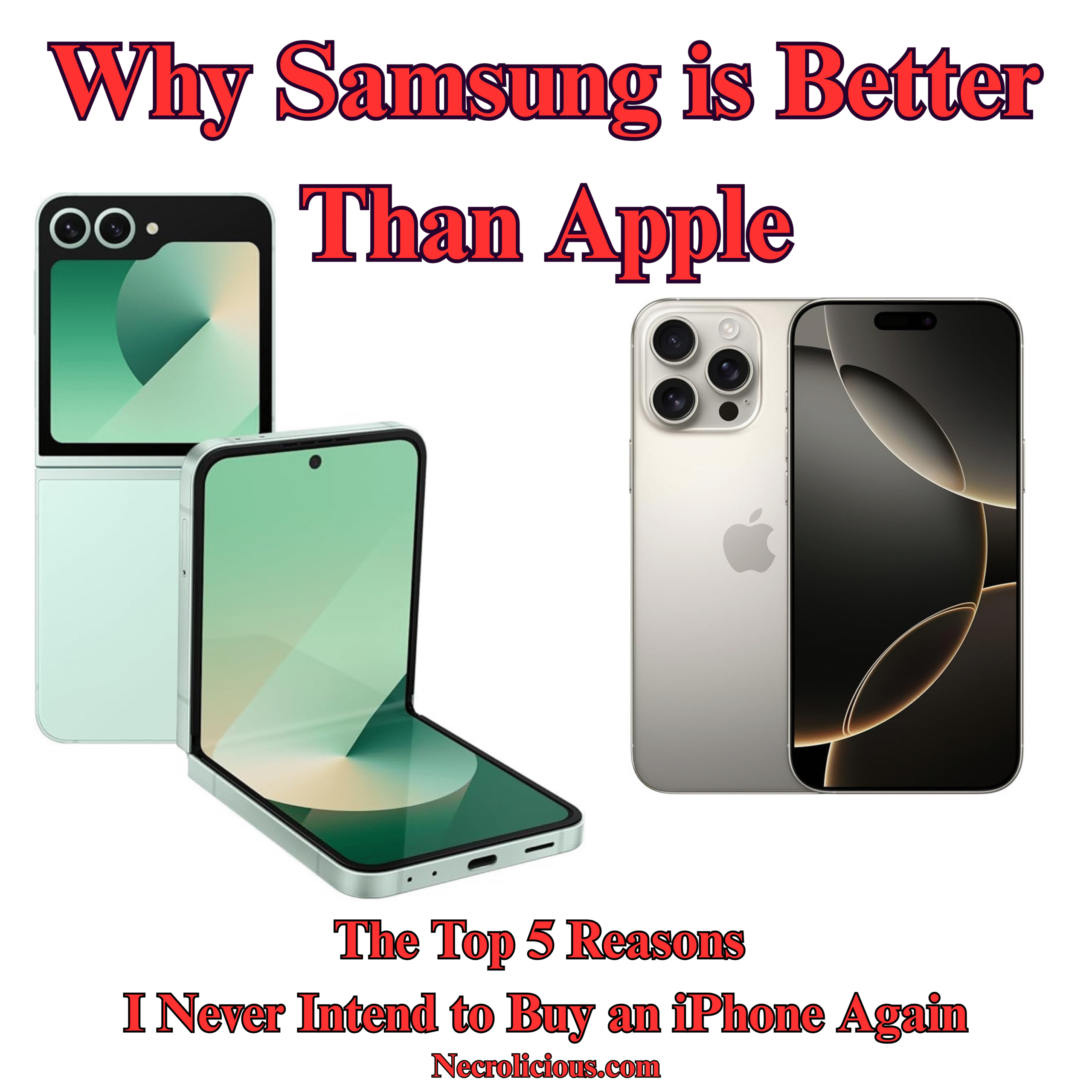
Why Samsung is Better Than Apple: The Top 5 Reasons I Never Intend to Buy an iPhone Again

I often post about Samsung here. I can’t recall if I’ve mentioned it before, but it might come as a surprise to some that I used to work on Apple’s social media marketing team (not iPhone, other Apple devices). Even then, I was not an Apple fanboy as I had just gotten my first Samsung Flip series phone before I got that job & I wasn’t about to buy a new iPhone less than a month after getting it just because I suddenly found myself working for Apple. In any case, I had switched between the two brands over the previous years, so I have a decent grasp of both UI‘s.

Here is a quick rundown of my smartphone history over the past decade:

  • iPhone SE
  • Samsung S10
  • iPhone SE 2
  • Samsung Flip 4
  • iPhone 13 Pro Max
  • Samsung Flip 6

While my first generation Apple SE was fairly comparable to the Samsungs on the market at the time, by the time the 13 Pro Max rolled out, we were looking at vastly different device experiences, which make iPhones feel cumbersomely outdated. The 13 Pro Max release solidified my opinion of Apple, since what I had previously considered might have been cost-cutting limitations on the SE series were revealed to be brand-wide. This is not to put down anybody with a crippling condition, but I cannot describe using an Apple device from Samsung as anything other than being disabled. For this article, I will provide the top 5 reasons I feel this way. I am not going to get into trivia that the average person wouldn’t notice, so we won’t be talking about things such as nits, we won’t even touch 60Hz versus 120Hz displays or go in depth on megapixels, but actual, usable smartphone features that make a realistic, noticeable difference to absolutely anybody. I truly think that if Apple fans knew what they were missing out on, they would not buy an iPhone ever again. It’s just a simple matter of the fact that they worship the brand. It’s not a matter of fact, usefulness, or accessibility, it’s simply brand worship.

1. Samsungs Have a Side Launcher

This is so unbelievably handy, I cannot stress it enough. Perhaps the worst thing about using an iPhone was not having this. Finding even my most used apps on iPhone was such a hassle. Due to various iOS changes over the years, the 13 Pro Max was nothing like the SE & SE2. Trying to find my apps, which were randomly arranged in various folders which I neither selected nor categorized, was always too much trouble, forcing me to use the search bar to open every app. It was painfully slow to get to anything. On the other hand, Samsung makes getting to my most used apps take less than a second, literally. This comes in handy, especially when it comes to the translation apps I often find myself using in casual meetings & conversations. To clarify, these don’t have to be your most used apps, they can simply be your favourite apps, contacts, reminders, clipboard, or tools. I simply have it set to the apps I use the most because that’s what works for me. I could go into this for hours, but simply put Samsung phones offer the most personalisation.

2. Samsungs Have 40-Slot Clipboards

Probably the second most shockingly inconvenient thing about iPhones is that they don’t have a clipboard. Yes, they have a copy-paste function, but no clipboard. With Samsung’s clipboard, you can see the last 40 things you copied, including text AND images. These do not reset even if you restart the phone, & you can even pin your most used ones. So, for example, if you have a set YouTube description that you reuse in every video, etc., you can easily pin that so you don’t have to type it out & you don’t have to go searching for it on an old video. You simply have it on your clipboard, accessible within seconds. A single copy-paste which does not even survive a restart simply does not cut it, especially after you get used to having arguably days of clipboard history on a Samsung.

3. Samsungs Have Dual-Screen Functionality

I don’t know at which point Samsung began to implement split screens across their devices. I first discovered it with the Flip 4, but it was not available on my Samsung S10, From what I understand, it is now available on even their normal slab phones. In any case, it has been a godsend for content creation in multiple aspects. Firstly, instead of installing a third-party teleprompter app with ads, watermarks & other inconveniences, you can simply open the Samsung Notes app & the camera app simultaneously to have your script right in front of you as you record. Secondly, when it comes to uploading these videos to social media, you can easily have X open on one screen & TikTok open on the other, copy-paste your descriptions, titles, etc. & post seconds apart—very important if you have an audience who expects you to post at the same time every day. iPhone just doesn’t have anything like this out of the box. I hear iPad does, but I guess for whatever reason, Apple does not see fit to add this to their phones. Maybe it’s because they want to sell more iPads? I don’t know, but it sure is inconvenient.

4. iPhone Cameras Are Not for Human Faces

I wish I had known this before I had bought the iPhone 13 Pro Max, but iPhone pictures are disgusting. Apple like to brag about their cameras having all the latest & greatest metrics, but their post-processing simply is not made for human faces. If you want to be a nature photographer, & capture a cliffside landscape, being able to count every crag & crevice in your images, an iPhone would be great for that, but when it comes to human faces, this makes them look ugly as Hell. You might think that this is cope, but there are countless TikTok videos of objectively attractive people saying the exact same thing.

@lauren_bulloch

I actually need someone at @apple to explain why my iPhone (that cost over a grand) makes me look like a corpse. Never buying another iPhone unless someone explains or fixes this bc this is ridiculous #iphoneistrash #iphone #apple #stevejobswouldnever

♬ original sound – Lauren
@taylorwingg

If anyone has any tips lmk but I feel like the iPhone camera is a lost cause

♬ original sound – Tay Wing

Personally, I look very orange in any photo shot on an iPhone.

I vaguely suspect that this post-processing is due to racial profiling since Apple is relatively “woke” & wants to target black demographics, whereas Samsung is more Asian-friendly. Anyway, perhaps it should be mentioned that women in Asia are carrying older model iPhones, specifically the XS, in addition to their current iPhone due to newer iPhones having such horrible post-processing.

@jinathegorgeous

Resale price of iphone XS is high high @apple 🫨 #korea #iphone #trends

♬ original sound – Jina


So, if you want to look grungy, ugly, with every pimple & oversized pore highlighted with a grey dinge on orange skin for contrast, get an iPhone. But, if you want to look nice in your photos with minimal to no effort, get a Samsung. Of course, iphone has a wide variety of filters but, having gone through all of them, absolutely none of them make any photos any better & you do not have the option to download any 3rd party ones to the default camera, whereas on Samsung there are countless filters available on the device with many more downloadable to the default camera available for free. This isn’t even getting into the more advanced editing features which have been on the latest flagships, but you can do simple things like skin smoothing & brightening to even your tone without looking cartoonishly unnatural & ugly on even the base camera. Seriously, the iPhone cameras have gotten so bad that the digital camera market has begun to pick up again for the first time in a decade because nobody wants to take ugly pictures on new Apple devices. It’s much more expensive & inconvenient to have to buy then carry both an iPhone & a digital camera than it is to just buy a Samsung phone, which gives you the best of both worlds with one device. This is increasingly important, especially if you’re creating on social media, because shooting from your dedicated digital camera then downloading from your digital camera to your phone to edit then upload is just too many steps to bother with. Videos are the largest data files, so transferring from an external device is cumbersome & time-consuming by any means. A large part of why I bought the DJI Pocket 3 was due to having bought the iPhone 13 Pro Max. During that time, I used the pocket 3 constantly instead of the iPhone camera, but ever since I got my Samsung flip 6 I’ve only used the Pocket 3 maybe two times.

5. On Samsung Phones, No App Subscriptions Are Necessary

Some of the features above can be bought via apps on iPhones– not all, but some. However, nearly every single app on the App Store requires a subscription. Let’s look at the split screen option I mentioned above. Yes, there is an app you can get on the App Store for this feature, but rather than paying for it once, getting it for free forever out of the box like you do on a Samsung, you have to pay something like $10 a month forever just to use this feature, & that’s just one app. If you want a camera app that doesn’t make you look like you just crawled out of a cave for the first time in a week like iPhone’s default camera does, that’s another $120. Gaming apps require subscriptions, video editing apps require subscriptions, wallpaper apps require subscriptions, phone layout apps require subscriptions, absolutely everything requires subscriptions on Apple. I could not believe the insane amount of limitation that was available out of the box from Apple. I guess because they’re taking a 30%-40% cut of all these subscriptions that they just don’t care to provide anything useful out of the box, & it shows. From a developer’s perspective, it’s more lucrative to target Apple users simply because they are so used to being price gouged for everything. On the flip side, not just Samsung, but all Android users are used to getting everything for free. They will actually review-bomb you if your app won’t open on their ancient devices rather than contact you directly about any problems or pay a dime so that you have the capital to improve anything. So, I can see why many developers would rather work for or with Apple, but from a user perspective, it’s not a good experience at all. iPhone supremacists commonly fall back on calling Android users poor. However, people increasingly come to realise that this personal attack is baseless, with Samsung & other industry leaders being at or even above iPhone unit pricing. Still, if you were to calculate all of the features that iPhone is missing out of the box that you have to pay for app subscriptions for just to get a Samsung level of usefulness from an iPhone, you’re easily paying another $500 – $1000 dollars every year, making Samsung devices a much better value since they have all of these permanently right out of the box, arguably “for free,” or at least priced into the device cost. I guess add that onto another $500-$1000 dollars for a separate digital camera. Between all the additional peripherals & app subscriptions, you’re looking at anywhere between $3000-$4000 just to get an iPhone working at the capacity that a $1000 Samsung does. It’s like wasting a fortune & countless hours modifying a decades-old luxury sedan for racing when a purpose-built, track-ready sports car is an all around better value from the start.

Samsung Galaxy Z Flip6

Buy from Amazon US

Buy from Amazon JP

Buy from Rakuten JP

Though I think that Samsung phones are markedly superior to iPhones, this opinion does not extend to watches. However, this is more for aesthetic purposes rather than functionality. They simply look better. In addition to the Apple Watch itself. I spent hundreds of dollars on a Japanese silver band for my Apple Watch 8, & it looks so good that I have no interest in changing it, not even to upgrade to a newer Apple Watch. At this point, I cannot imagine any feature which could possibly be added that would exceed the usefulness that my Watch 8 already provides. Really, what else could it do? It already has transit/credit NFC payments, health monitoring &, of course, clock capabilities. Google Maps are neutered & Apple Maps suck. I don’t really need it for music & it’s too small to really appreciate most photos, as most watch devices are. Realistically, I think the watch market has reached its pinnacle. There’s some Apple fan talk of adding cameras with some knockoff Apple watches already having them, but absolutely nobody’s clamoring over these features, & Apple has made no hint of being impressed enough to try launching them on official devices–which I think might be a smart move because just from a photographer’s perspective, you really can’t get great photo angles/lighting from your wrist.

Anyway, this preference for Apple Watch also led to another reason why I greatly dislike iPhones. You see, in Japan, as an anti-perversion measure, all cell phones make a sound when you take a picture. Unfortunately, when you pair your Apple Watch with your iPhone, the two devices often unlock each other at random, making a clicking noise which could be perceived as a camera shutter. This made me very paranoid, especially when I’m on trains or even just talking to random people, that they or someone around me would think I was sneakily taking pictures when my watch or phone simply decided to unlock at a random moment. While no one ever said anything, it was a constant uneasy paranoia which I was greatly relieved to be rid of upon switching from the iPhone 13 Pro Max to the Samsung Flip 6. While I keep my SE2 for the functionality needed to maintain my Apple Watch, since I never take this device with me the locking noise/camera noise issue has disappeared from my life. Thankfully.

Perhaps it is important to note that my affinity for Samsung is not like that of iPhone fans, who demonstrate blind loyalty to the brand as if they were somehow married to Apple—even when all common sense suggests that Samsung offers superior functionality, convenience & value. Instead, it is these superior features themselves that keep me returning to Samsung when purchasing new devices.

If another phone company, especially a Japanese one, were to introduce features superior to those of Samsung—even if it were Apple, following an extreme overhaul of its UI—I would simply choose the better device rather than prioritize a brand name. It just so happens that Samsung consistently delivers the best features I have ever found in any device. So, I will continue buying them until that is no longer the case.

Unless otherwise noted, image assets above are NOT original content & are shared under fair use doctrine with NO claims to authorship or ownership.
Contact necrolicious@necrolicious.com for credit or removal.

This post was sponsored by…ME! If you’d like to support, please buy my original meme merchandise or check out my affiliate links to get yourself some other cool things. Additional affiliate links may be contained in the above article. If you click on an affiliate link & sign up/make a purchase, I may earn a commission. This does not increase the price you pay for the product or service, so it helps support this website at no cost to you.

Share this:

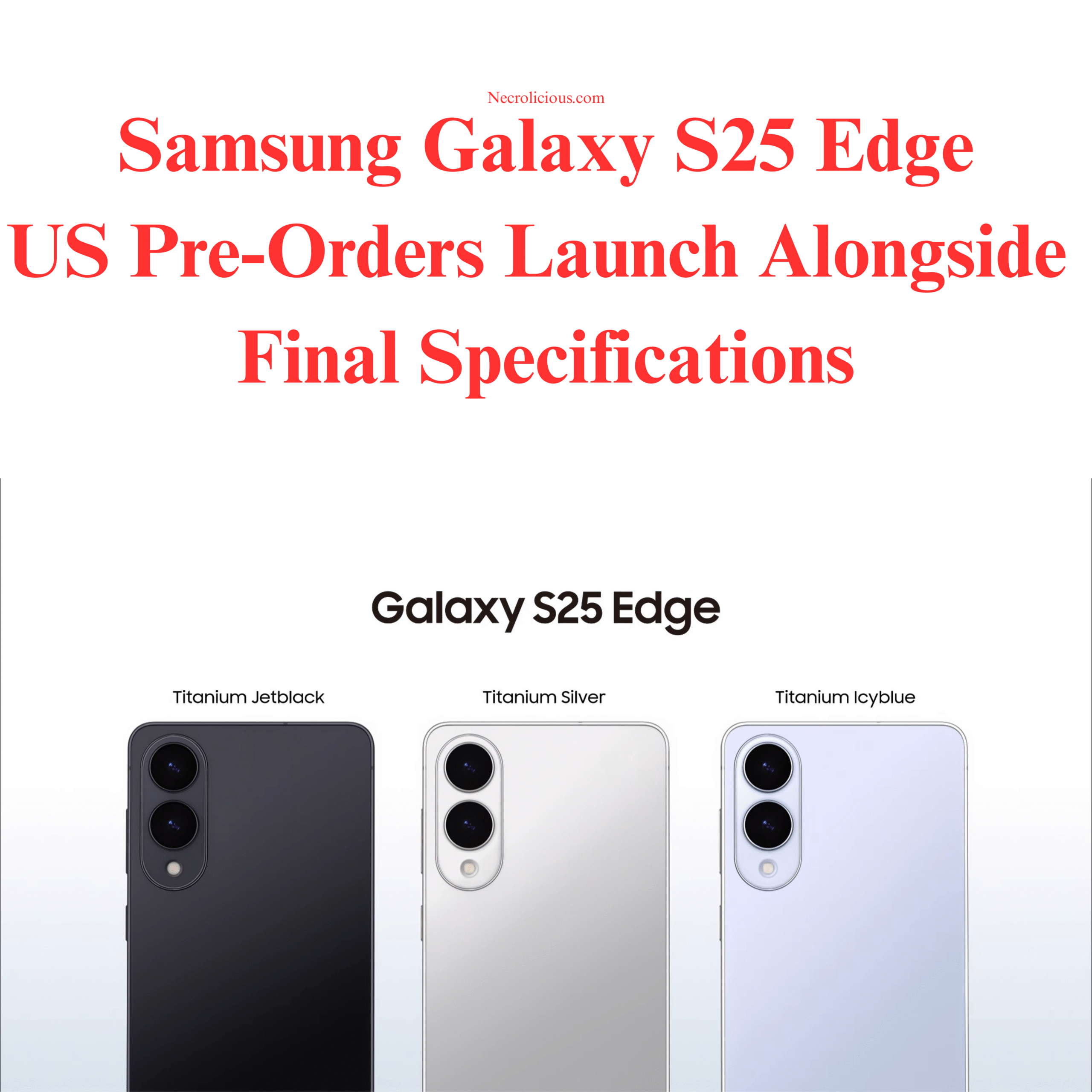
Samsung Galaxy S25 Edge US Pre-Orders Launch Alongside Final Specifications

Samsung unveiled the Galaxy S25 Edge on 13 May 2025 during its May Unpacked event, introducing a device that measures 5.8mm in thickness & weighs 163 grams, making it the slimmest in the S25 series. The phone has garnered attention for its design & specifications, but as I write from Japan, I’m opting to wait on this model—& the entire S25 lineup—due to personal preferences & regional market factors.

The Galaxy S25 Edge features a 6.7-inch QHD+ Dynamic AMOLED 2X LTPO display with a 120Hz refresh rate, protected by Corning Gorilla Glass Ceramic 2, which can endure drops from 3.3 feet onto concrete (NotebookCheck.net, 11 May 2025). It’s equipped with the Qualcomm Snapdragon 8 Elite processor, 12GB of LPDDR5x RAM, & storage options of 256GB or 512GB (UFS 4.0). The camera setup includes a 200MP main sensor with optical image stabilisation & 2x optical zoom, alongside a 12MP ultra-wide lens & a 12MP front camera. Running Android 15 with One UI 7, the device supports connectivity options such as WiFi 7 & Bluetooth 5.4, housed in a titanium frame with an IP68 rating.

Here’s how the S25 Edge compares to the rest of the S25 series:

FeatureGalaxy S25Galaxy S25+Galaxy S25 UltraGalaxy S25 Edge
Display6.2″ QHD+ Dynamic AMOLED 2X, 120Hz6.7″ QHD+ Dynamic AMOLED 2X, 120Hz6.9″ QHD+ Dynamic AMOLED 2X, 120Hz6.7″ QHD+ Dynamic AMOLED 2X LTPO, 120Hz
Display ProtectionCorning Gorilla Glass (unspecified)Corning Gorilla Glass (unspecified)Corning Gorilla Armour 2Corning Gorilla Glass Ceramic 2 (front), Victus 2 (back)
ProcessorQualcomm Snapdragon 8 EliteQualcomm Snapdragon 8 EliteQualcomm Snapdragon 8 EliteQualcomm Snapdragon 8 Elite
RAM12GB LPDDR5x12GB LPDDR5x12GB (16GB in select markets)12GB LPDDR5x
Storage Options256GB, 512GB (UFS 4.0)256GB, 512GB (UFS 4.0)256GB, 512GB, 1TB (UFS 4.0)256GB, 512GB (UFS 4.0)
Operating SystemAndroid 15, One UI 7Android 15, One UI 7Android 15, One UI 7Android 15, One UI 7
Rear Camera50MP (main), 12MP (ultra-wide), 10MP (telephoto, 3x zoom)Same as S25200MP (main), 50MP (ultra-wide), 10MP (3x telephoto), 50MP (5x periscope telephoto)200MP (main, OIS, 2x optical zoom), 12MP (ultra-wide)
Front Camera12MP12MP12MP12MP
Battery Capacity4000mAh4700mAh5000mAh3900mAh
Wired Charging25W45W45W25W
Wireless Charging15W15W15WSupported (15W)
Thickness7.2mm7.2mm8.22mm5.8mm
Weight162g190g218g163g
Frame MaterialAluminiumAluminiumTitaniumTitanium
IP RatingIP68IP68IP68IP68
Additional FeaturesS Pen supportUltrasonic in-display fingerprint scanner, Bluetooth 5.4, WiFi 7/6/5, dual stereo speakers
Price (USD)$800$1,000$1,300$1,099

For those interested in securing a Galaxy S25 Edge, pre-orders are available in the US & select markets as of 13 May 2025, with shipping expected to begin on May 23, 2025. You can pre-order NOW on Amazon.

AMAZON PRE-ORDER BUNDLE: Get a FREE $50 Amazon Gift Card, plus double the storage when you pre-order the new Galaxy S25 Edge.
Select the gift card bundle variation for redemption. Gift card may ship separately. Offer ends 5/29.

The S25 Edge, priced at $1,099, comes in Titanium Jetblack, Titanium Silver, & Titanium Icyblue. Its 3900mAh battery & 25W charging have sparked debate, with some reports indicating similar capacities in the S25 series often require midday charging (9to5Google, 2025). The device aligns with the trend of ultra-thin smartphones, competing with models like the upcoming iPhone 17 ‘Air.’ However, I’m not proceeding with a purchase. As with the base S25, which I also skipped, I’m awaiting news of the Galaxy Z Flip 7, expected around July or August 2025—roughly two months away. Rumours suggest the Flip 7 may feature a Snapdragon 8 Elite chipset (or possibly an Exynos 2500), a 4-inch cover display, & a 4300mAh battery. As someone interested in foldables, I’m keen to see how Samsung progresses its flip phone range, especially after the Z Flip 6’s recognition for camera performance amongst foldables.

Being in Japan is another factor. Unlike in the U.S., where the S25 Edge has launched, there’s no news of its release here, with all official social media quietly ignoring the news, as is the norm. Samsung’s Japanese launches typically trail the West by several months, a curious delay given Japan’s proximity to Samsung’s Korean headquarters in Suwon. This lag, often linked to Apple’s dominance (46-49% market share, per NCESC.com) in the Japan market, suggests I may not see the S25 Edge until late summer or early autumn. This delay, combined with my greater interest in the Z Flip 7, makes waiting a more practical choice.

The Galaxy S25 Edge offers a slim design & modern specifications for those seeking such a device. For me, however, the prospect of Samsung’s next foldable & Japan’s market dynamics mean I’ll hold off for now.

Unless otherwise noted, image assets above are NOT original content & are shared under fair use doctrine with NO claims to authorship or ownership.
Contact necrolicious@necrolicious.com for credit or removal.

This post was sponsored by…ME! If you’d like to support, please buy my original meme merchandise or check out my affiliate links to get yourself some other cool things. Additional affiliate links may be contained in the above article. If you click on an affiliate link & sign up/make a purchase, I may earn a commission. This does not increase the price you pay for the product or service, so it helps support this website at no cost to you.

Share this:

Samsung One UI 7 Deletes the Ivory Filter, Here Are the Top 3 Free Replacements for the Ivory Filter

I previously expressed concern that Ivory was gone from the S25 demo models, but I guess my Samsung Flip 4 was set to automatically update, because when I picked it up last week, I realised it had updated to One UI 7. I didn’t have any particular problem with this, since I don’t generally use this old phone—its screen is cracked, so it mainly functions as a surveillance camera at this point—but I decided to take a tour of what One UI 7 offers, & to my horror, I discovered that the Ivory filter was gone, replaced with the same camera set up as the S25.

I had been waiting to install One UI 7 on my daily use Flip 6, but seeing that the Ivory filter—my favourite, main filter—was gone, I am now doing EVERYTHING I can to prevent One UI 7 from installing on this main phone. After all, the fact that iPhone did not have any such filter was a major factor in why I got a DJI Pocket 3 but STILL switched back to Samsung after only about 6 months–having 2 devices, neither of which had my preferred filter just to get kind of close to what I wanted was just too much hassle to deal with.

Anyway, in an effort to avoid what now appears to be inevitable, as well as to help others who are currently experiencing the same issue, I preemptively tried looking for a replacement for the Ivory filter on the updated Flip 4 by downloading EVERY available filter. Here are my findings. Note that the Ivory filter is applied on the Flip 6 on the right for reference.

@necrolicious

Samsung Flip 4をOne UI 7にアップデートしたのですが、残念ながらお気に入りのアイボリーフィルターが消えてしまったので、代わりのフィルターを探しています。 記事全文は私のブログでご覧いただけます。 @Samsung Japan もしご覧になっていたら、アイボリーフィルターを復活させてください! One Ui 7 が Flip 6 にインストールされないように、あらゆる手段を講じてアイボリーフィルターを失わないようにしています。 #サムスン #samsung #oneui7 #samsunggalaxy #samsungflip4 #samsungflip6 #スマホ #スマートフォン #スマホカメラ #カメラ #フィルター

♬ ドアを開けなさい (Instrumental) – K-FORCE Samplate

Since One UI 7 allows you to create custom filters by using old photos as a template to apply to new ones, it seems like a no-brainer that you could easily get the Ivory filter back by simply selecting an Ivory-shot photo for this purpose, but that doesn’t work. What makes the Ivory filter special isn’t just that it overexposes whites—it ALSO adds a neon tinge to pink/red hues & a slight, dreamy haze to soften everything. Trying to create a custom filter using an Ivory-shot photo only succeeds halfway in the former aspect; you don’t get any neon hues, & the haze is more grey than soft fuzziness. My frame of reference for this is my purple contact lenses, to which the Ivory filter always lent a dramatic pop. As you can see, no such thing happens when using this custom filter.

Therefore, I cannot recommend this method of trying to get the Ivory filter back. If your goal is simply to look pale, goth or vampiric, there are better options than trying to use an Ivory-filtered photo to create a custom filter in an attempt to replace it. For those who want a closer replacement to the original Ivory filter, with neon tinge & dreamy haze, these are the best free downloadable filters that I can find for the native camera app. There may be additional third-party camera apps which better replicate the Ivory filter, but for the purpose of this article I am only focusing on downloadable filters which are available through the native Samsung camera app therefore requiring no additional apps or in app purchases/subscriptions. I’d like to further mention that this article is in no way sponsored by Samsung or these filter developers (but please sponsor me someday, Samsung!).

1. STUDIO SJ – CK01 (Filter #49)

Get it on the Galaxy Store here: https://apps.samsung.com/appquery/appDetail.as?appId=com.candycamera.android.filter.CK01

This one probably has the most white. As you can tell, that also washes out even the blacks in any image. If you’re going for contrast, the greys this offers might not be what you want.

2. STUDIO SJ – NewYork14 (Filter #42)

Get it on the Galaxy Store here: https://apps.samsung.com/appquery/appDetail.as?appId=com.candycamera.android.filter.NewYork14

This one offers more contrast to dark colours, especially when compared to CK01, but it imparts slightly beige tones as well. If you want brighter whites, this might be too neutral.

3. STUDIO SJ – Rainbow07 (Filter #29)

Get it on the Galaxy Store here: https://apps.samsung.com/appquery/appDetail.as?appId=com.candycamera.android.filter.Rainbow07

This one seems to offer the most pinks/reds of any of the three options. Like CK01 It lacks contrast when presenting any darker colors, making NewYork14 more attractive to any who wants darker blacks.

As you can tell, there is no exact one-for-one match to the real Ivory, making older devices or keeping current devices on older UI a more attractive option.

There seems to be an increasing demand for the return of the Ivory filter. You can do your part by joining the increasing number of voices asking Samsung to restore it but, in the meantime, it seems like these are the best available replacements.

As a bonus mention, somebody else in Samsung forums suggested the c360p1 filter as an Ivory replacement, but I have no idea why they did this because it doesn’t look like Ivory at all. It’s just washed out with no neon pop or haze.

Buy a Samsung Galaxy Z Flip6 & Don’t Update to One UI 7 To Keep the Ivory Filter!

Buy from Amazon US

Buy from Amazon JP

Buy from Rakuten JP

Unless otherwise noted, image assets above are NOT original content & are shared under fair use doctrine with NO claims to authorship or ownership.
Contact necrolicious@necrolicious.com for credit or removal.

This post was sponsored by…ME! If you’d like to support, please buy my original meme merchandise or check out my affiliate links to get yourself some other cool things. Additional affiliate links may be contained in the above article. If you click on an affiliate link & sign up/make a purchase, I may earn a commission. This does not increase the price you pay for the product or service, so it helps support this website at no cost to you.

Share this: